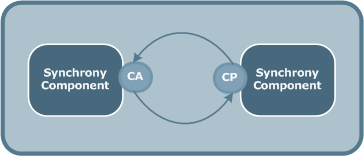
Note: This book does not describe how to complete the Connection Point tabs. This information is specific to each Axway product. For more information, refer to the product-specific documentation.
The Channel object manages communication between the CommPoints, or access points, of two software components (Axway Servers, Applications and Partners).
When you create a Channel between two software objects, you define the basic attributes of the two parties involved in the communication. Communication can be:
Each end of the Channel is connected to a CommPoint that is based on a given CommAdapter type, or protocol, which in turn is based on a given CommNetwork, or network type.
A Channel can only connect software objects that have compatible CommPoints, that is, they must use the same CommAdapter type and the same CommNetwork type.
Depending on the Axway product you are using, you can specify a primary Physical Channel and up to four backup Channels to use for communication. If one Channel fails or is unavailable, the software uses the next backup Channel defined in the list.
A Channel can link the CommPoints of:
After you define the software objects (Axway Servers, Applications and Partners) that you want to communicate, you must define the Channel - the communication path between them. The endpoint at each end of the Channel is referred to as a Terminus.
Each Terminus has a CommPoint that defines how to access the software. For two software objects to communicate, their CommPoints must be compatible (that is, based on CommAdapters of the same type).
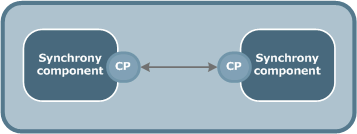
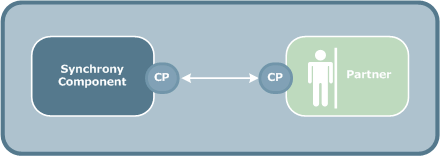
In Peer to Peer communication, each party has the same capabilities and either party can initiate a communication session.
The following diagram schematically illustrates Peer to Peer communication where the software at each end of the Channel is an Axway Server. The Channel connects the Axway Servers via a CommPoint (CP).
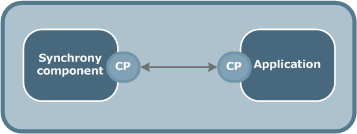
The following diagram illustrates Peer to Peer communication between a Axway Server and an Application whose CommAdapter is defined locally (inside the Application definition).
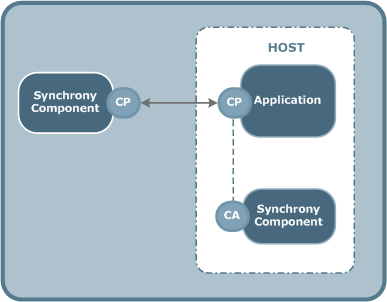
The following diagram illustrates Peer to Peer communication between a Axway Server and an Application whose CommPoint is based on a CommAdapter that is defined on an Axway Server on the same Host.
The following diagram illustrates Peer to Peer communication between a Axway Server and a Partner whose CommAdapter is defined locally (inside the Partner definition).
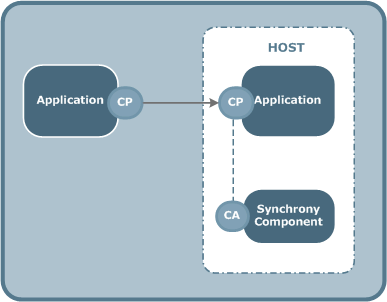
The following diagram illustrates Peer to Peer communication between an Application with a local CommAdapter and an Application whose CommPoint is based on a CommAdapter that is defined on a Axway Server on the same Host.
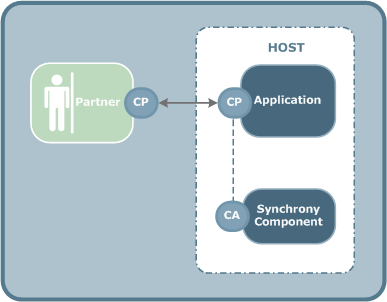
The following diagram illustrates Peer to Peer communication between a Partner (with local CommAdapter) and an Application whose CommPoint is based on a CommAdapter that is defined on a Axway Server on the same Host
Client/Server communication describes the relationship between two computer programs in which one program, the client, makes a service request from another program, the server, which fulfills the request.
The following diagram illustrates Client/Server communication between a Axway Server and a Partner. A separate Channel is required for each flow direction (Client to Server or Server to Client).
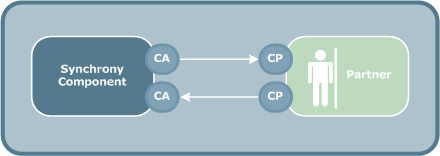
The following diagram illustrates Client/Server communication between a Axway Server and an Application. A separate Channel is required for each flow direction (Client to Server or Server to Client).
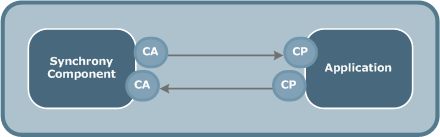
The following diagram illustrates Client/Server communication between two Axway Servers. A separate Channel is required for each flow direction (Client to Server or Server to Client). However, this type of Channel only requires a single CommAdapter and CommPoint for each Terminus.