KB Article #191320
Standard cluster with PostgreSQL - fix File Tracking replication issue
Problem
The standard cluster architecture post 5.5 September 2024 update has bidirectional replication on embedded PostgreSQL databases for ST configuration data, events, and file tracking. The file tracking tables have partitions for each day. ST creates minimum 3 partitions for future days. The number of future partitions is controlled by server configuration parameter Partition.DaysToPrebuild. Once a new partition is created the replication must be refreshed otherwise the replication is not working properly. The replication of file tracking is important for ST database failover feature. ST versions prior to 5.5-20250731 does not perform refresh on replication upon creating new partitions.
To detect the issue count rows for partitions of tables subtransmissionstatus, transferdata, transferdetails, transferprotocolcommands, and transferresubmitdata using one of below SQL queries. To connect to database on Linux use the article KB 183168
SQL query to count rows per table using statistics.
SELECT schemaname as table_schema, relname as table_name, n_live_tup as row_count
FROM pg_stat_user_tables
ORDER BY table_name;
SQL query to count rows per table using raw calculations.
select table_schema, table_name, cast(cast(( xpath('/row/cnt/text()', xml_count) )[1] as text) as int) as row_count
from (
  select table_name, table_schema, query_to_xml(format('select count(*) as cnt from %I.%I', table_schema, table_name), false, true, '') as xml_count
  from information_schema.tables where table_schema in (select schemaname from pg_tables where tablename='st_version')
) t;
Resolution
1. Manually sync DBs (optional)
Manually synchronize databases with REST-API request on core (backend) server with primary database:
curl -k -u <admin user>:<admin password> -X 'POST' \
  'https://<Server IP or hostname>:<admin port>/api/v2.0/configurations/replication/operations' \
  -H 'accept: */*' \
  -H 'Content-Type: application/json' \
  -d '{
  "operation": "enable_replication",
  "password": "<DB password>"
}'
Check PostgreSQL logs on all servers for the results of synchronization.
2. Manually create 90 future partitions.
Manually create 90 future partitions on each core (backend) server from Admin UI -> Setup -> Database Settings -> Connection Settings -> Database Partitioning.
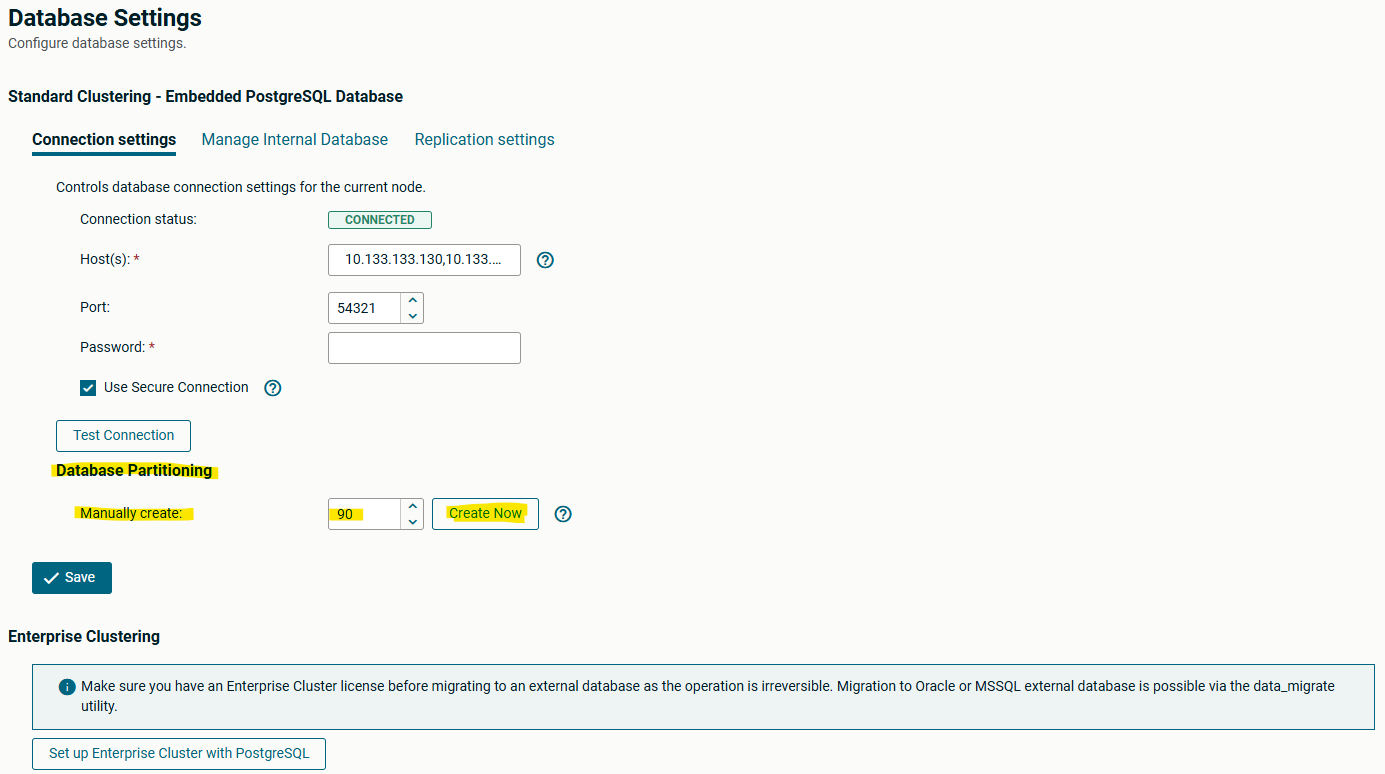
Alternatively use REST-API to manually create 90 partitions:
curl -k -u <admin user>:<admin password> -X 'POST' \
  'https://<Server IP or hostname>:<admin port>/api/v2.0/configurations/database/operations?operation=createPartitions&numberOfPartitions=90' \
  -H 'accept: */*' \
  -H 'Content-Type: multipart/form-data' \
  -F 'port='
3. Verify that partitions were created.
Verify from Admin UI -> Operations -> Server Log those partitions were created.
Example output:
2025-07-27 12:56:36,974    INFO    ADMIN    https-jsse-nio-0.0.0.0-444-exec-12    10.133.133.130    0 partition(s) created on table transferresubmitdata
2025-07-27 12:56:36,967    INFO    ADMIN    https-jsse-nio-0.0.0.0-444-exec-12    10.133.133.130    0 partition(s) created on table transferprotocolcommands
2025-07-27 12:56:36,965    INFO    ADMIN    https-jsse-nio-0.0.0.0-444-exec-12    10.133.133.130    0 partition(s) created on table transferdetails
2025-07-27 12:56:36,964    INFO    ADMIN    https-jsse-nio-0.0.0.0-444-exec-12    10.133.133.130    0 partition(s) created on table transferdata
2025-07-27 12:56:36,961    INFO    ADMIN    https-jsse-nio-0.0.0.0-444-exec-12    10.133.133.130    0 partition(s) created on table subtransmissionstatus
2025-07-27 12:56:36,956    INFO    ADMIN    https-jsse-nio-0.0.0.0-444-exec-12    10.133.133.130    0 partition(s) created on table logging_event_property
2025-07-27 12:56:36,953    INFO    ADMIN    https-jsse-nio-0.0.0.0-444-exec-12    10.133.133.130    0 partition(s) created on table logging_event_exception
2025-07-27 12:56:36,892    INFO    ADMIN    https-jsse-nio-0.0.0.0-444-exec-12    10.133.133.130    0 partition(s) created on table logging_event
2025-07-27 12:56:36,873    INFO    ADMIN    https-jsse-nio-0.0.0.0-444-exec-12    10.133.133.130    86 partition(s) created on table transferresubmitdata
2025-07-27 12:56:30,384    INFO    ADMIN    https-jsse-nio-0.0.0.0-444-exec-12    10.133.133.130    86 partition(s) created on table transferprotocolcommands
2025-07-27 12:56:26,870    INFO    ADMIN    https-jsse-nio-0.0.0.0-444-exec-12    10.133.133.130    86 partition(s) created on table transferdetails
2025-07-27 12:56:22,659    INFO    ADMIN    https-jsse-nio-0.0.0.0-444-exec-12    10.133.133.130    86 partition(s) created on table transferdata
2025-07-27 12:56:19,917    INFO    ADMIN    https-jsse-nio-0.0.0.0-444-exec-12    10.133.133.130    86 partition(s) created on table subtransmissionstatus
2025-07-27 12:56:17,850    INFO    ADMIN    https-jsse-nio-0.0.0.0-444-exec-12    10.133.133.130    86 partition(s) created on table logging_event_property
2025-07-27 12:56:15,107    INFO    ADMIN    https-jsse-nio-0.0.0.0-444-exec-12    10.133.133.130    86 partition(s) created on table logging_event_exception
2025-07-27 12:56:12,895    INFO    ADMIN    https-jsse-nio-0.0.0.0-444-exec-12    10.133.133.130    86 partition(s) created on table logging_event
In case of any issues with create partitions repeat the previous step 2.
4. Find subscription names.
Find the subscription name from Admin UI -> Setup -> Database Settings -> Replication settings. It should be something like transferlog_<string>, and each server should have a different subscription.
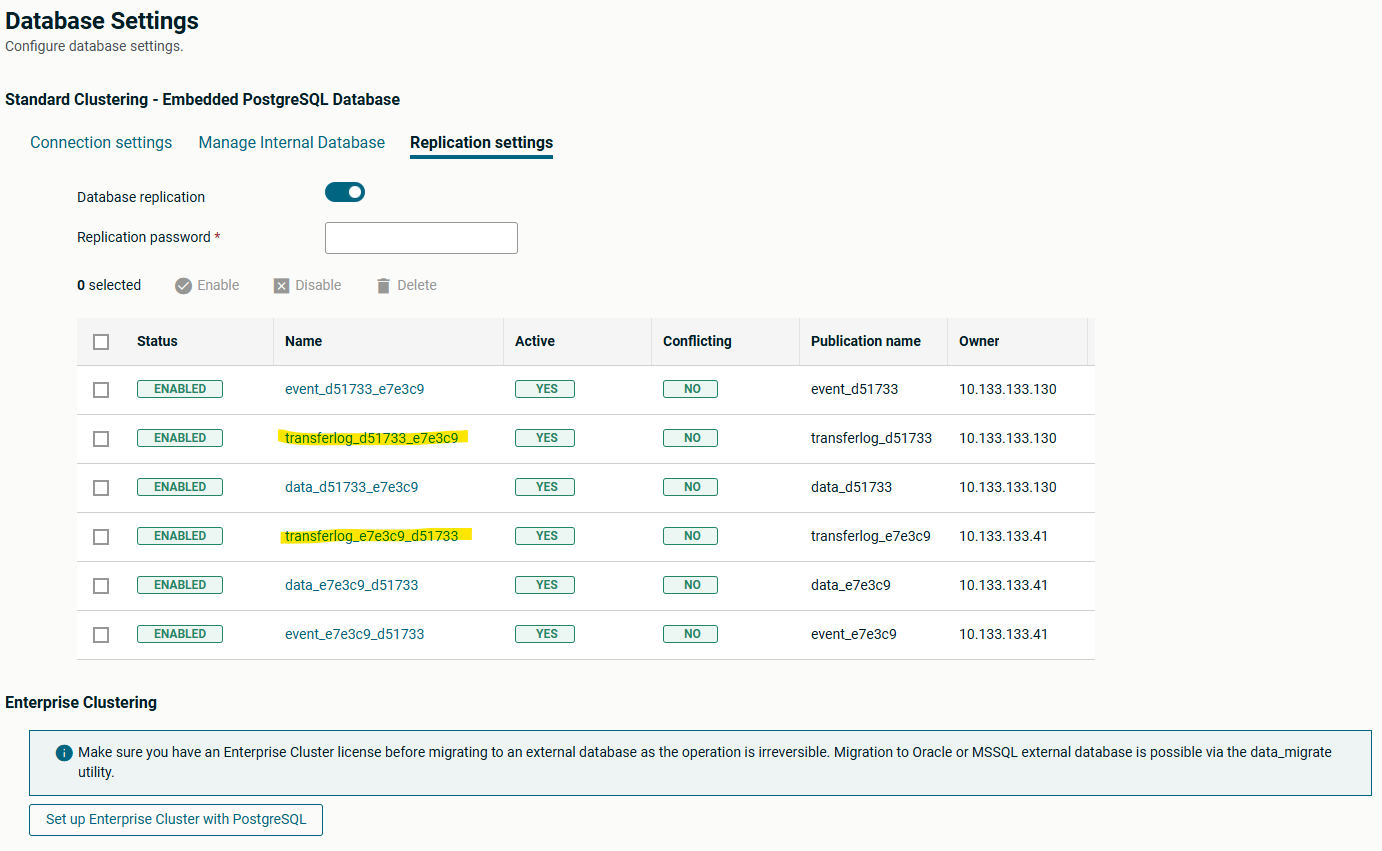
Alternatively use SQL query below to find subscription name on each core (backend) server:
select subname from pg_subscription where subname like '%transfer%';
5. Refresh subscriptions.
Refresh subscription on each core (backend) server with SQL query:
alter subscription transferlog_<string> refresh publication with (copy_data=false);
The above procedure provides a solution for replication issue for 3 months. It must be repeated (excluding point 1) before ST starts to create future partitions. If Partition.DaysToPrebuild is empty, then repeat the procedure after 85 days or earlier. If Partition.DaysToPrebuild has value use formula (90 - Partition.DaysToPrebuild - 2) to calculate the latest day from now when you need to repeat the procedure.