KB Article #177075
Prevent messages that are quarantined as SPAM and have triggered VOD from being released
Problem
The Virus Outbreak Detention (VOD) policy in MailGate, if triggered, is set to detain suspicious messages for N hours [as configured under Content Policies > Virus Outbreak ], then reprocess the message and detain it again, if a virus is not found yet. On the third reprocess, if found to be clean, the message is released to the delivery policy phase and processed further.
However, if this message has previously been quarantined by the Global Anti-Spam policy and the VOD policy triggers upon the release by the end user, the latter can enforce the message to be delivered by clicking on the "Send To Me" button 4 consecutive times, effectively reaching the maximum number of VOD re-attempts, thus - releasing the message.
This behavior would only be possible if the following conditions are met:
- The email was originally quarantined and set to be "visible to user"
- The user has PQM enabled and has either received the report with the message in question or has logged in to the enduser interface [if allowed].
- The user attempts to release the message and the message triggers the VOD policy.
- If the user is releasing the message through the enduser UI, they will see the VOD indicator for the message to be on, warning them that the message possibly contains a virus. If this warning is disregarded and the message release is attempted 3 more times, the VOD policy will release the message
- If no further delivery phase policies trigger upon the message and stop it, the message will be delivered to the user
Resolution
In order to prevent end users from brute-forcing the release option and avoid messages that have been stopped both by the Anti-Spam and VOD policies to be released, administrators may implement a custom policy as described below.
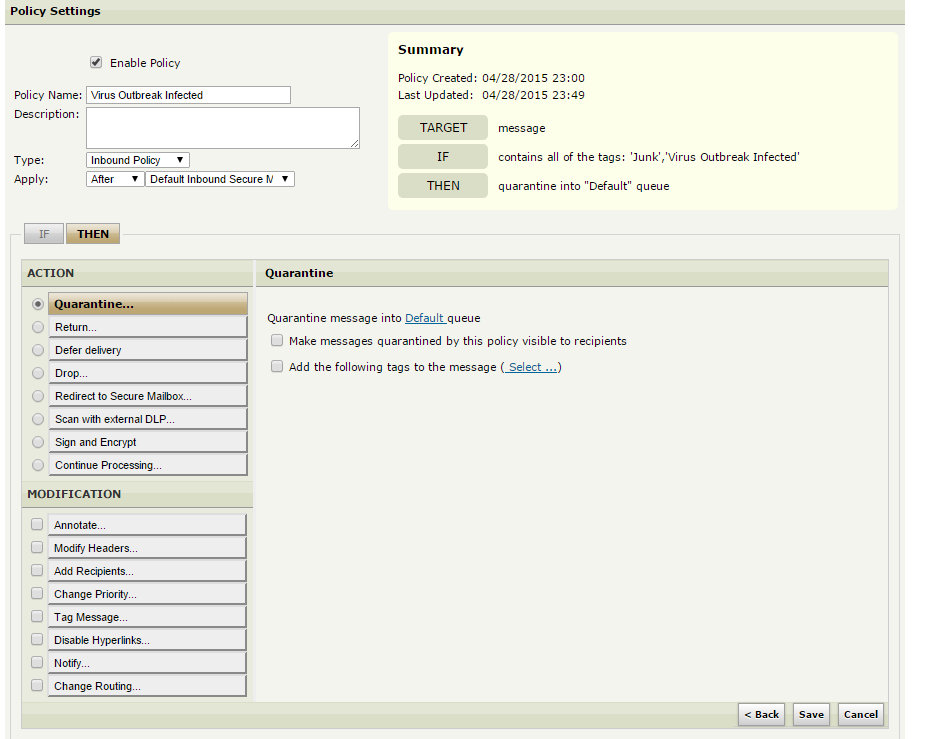
1. Go to Content Policies > Inbound Policies > Delivery > New Delivery Policy
2. Under "IF" select Tag > contains ALL of the tags: 'Junk', 'Virus Outbreak Infected' [make sure to select "ALL" from the drop-down in the Tag section]. Click Next.
3. Under "THEN" select Quarantine and make sure that "Make messages quarantined by this policy visible to recipients" is NOT checked.
4. Make sure that the policy is placed after the Default Anti-Virus policy, specify a name and a description, save and enable the policy.
Expected behavior:
Since the message will be detained the first couple of times a user attempts to release the suspicious message, this policy will only trigger if the user clicks on "Send to me" a third time. Since "Visible to user" is not enabled, the message will no longer be available for release by the end user.