KB Article #181143
RESTAPI: Manipulate Persistence Service entries via REST API
Abstract
SecureTransport 5.5 Update 3 introduced a new pluggable transfer sites SPI service called Persistence Service. It allows a custom Transfer Site implementation to store and retrieve Site instance configuration data at runtime, during the execution of the a transfer. This data is stored as custom attributes for the Transfer Site and it can also be accessed via the ST REST API.
For more information on using the SPI service from Java code, refer to the ST Developers Guide.
This article explains how to use the REST API to access and manipulate this persisted data.
Data Format
This section describes how stored data is represented as custom attributes for the Transfer Site.
Each storage entry is represented by two attributes:
storage.key.<key> - This attribute represents the actual data. The value is the stored data in an encrypted format.
storage.mtime.<key> - This attribute represents the last modified date of the entry. The value is a string representing the date and time when the data has been modified last. The date is in UTC and has the ISO string format.
Example
For a Transfer Site called "ftp", using a property called "lastUploadedFile" two new entries with this key - lastUploadedFile - are stored using the PTS service. This results in the following custom attributes for the Site:
| Key | Value |
storage.key.lastUploadedFile |
{AES128}R0obNMsLQbs6vdJd2LcyDw== |
storage.mtime.lastUploadedFile |
2020-09-09 05:05:10.402 |
Read the data
The REST API can be used to retrieve all stored entries for a Transfer Site. This can be achieved by executing a GET request for the Site. The result contains all custom attributes for the Site. All attributes that have the format described above are storage entries.
Stored data is encrypted. Use the aesdec tool as explained in KB 179327 to decode it.
Example
Execute an API request for the Site:
curl -X GET "https://10.232.15.170:444/api/v1.4/sites/ftp" -H "accept: application/json"
The result would look like this:
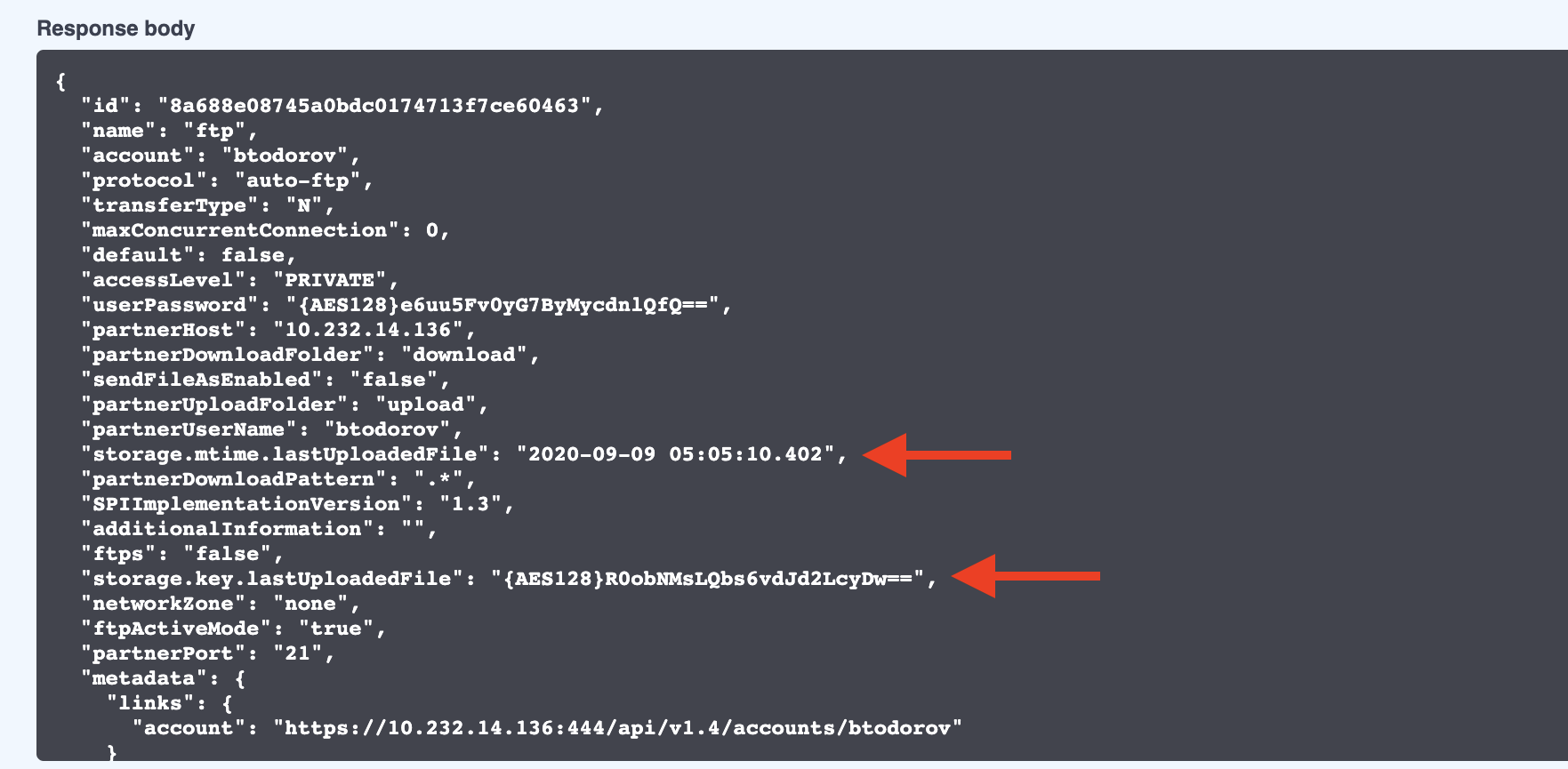
Response JSON object for the Site, containing the custom attributes with the stored entries
Create/Update stored data
The REST API can be used to create and update storage entries. This can be achieved by executing a POST request for the Site. Note that when creating or updating entry, both custom attributes have to be updated.
Stored data has to be encrypted. Use the aesenc tool as explained in KB 179327 to encode it.
Example
Execute an API request for the Site:
curl -X POST "https://10.232.15.170:444/api/v1.4/sites/ftp" -H "accept: application/json" -H "Content-Type: application/json" -d "{ \"storage.key.lastUploadedFile\": \"{AES128}e6uu5Fv0yG7ByMycdnlQfQ==\", \"storage.mtime.lastUploadedFile\": \"2020-09-10 07:05:10.402\"}
Delete the stored data
The REST API can be used to delete storage entries. This can be achieved by executing a POST request for the Site. When deleting an entry both custom attributes have to be removed (setting them to null).
Example
Execute an API request for the Site:
curl -X POST "https://10.232.15.170:444/api/v1.4/sites/ftp" -H "accept: application/json" -H "Content-Type: application/json" -d "{ \"storage.key.lastUploadedFile\": null, \"storage.mtime.lastUploadedFile\": null}"