KB Article #71206
Configuring Administrators LDAP Authentication plugin for SecureTransport
Overview
The Administrators LDAP Authentication plugin allows Basic Authentication against LDAP source for SecureTransport (ST) administrator accounts.
This plugin can be deployed on either ST Edge or Server, as needed and it supports configuration of up to two LDAP servers, allowing for fallback to a secondary source.
To be authenticated by this plugin, the ST Administrator accounts must be created with the “Password is stored locally (not in external directory)” option disabled.
For more information on operating with authentication plugins, please refer to the SecureTransport Administrator's Guide
[ST 5.5 Administrator Guide] [ST 5.4 Administrator Guide] .
Prerequisites
Please make sure the following requirements are met before installation
ST 5.4 Patch 43 or greater installed and operational
ST 5.5 20201218 or greater installed and operational
Download
The Administrators LDAP Authentication plugin installation package can be downloaded from the AMPLIFY Repository.
Installation
To install the Administrators LDAP Authentication plugin, perform the following steps on all SecureTransport Server / Edge nodes:
Delete the following files/folders associated with the previous version of this plugin (if they exist):
<FILEDRIVEHOME>/plugins/transferSites/axway-securetransport-plugins-authentication-admin-ldap.jar<FILEDRIVEHOME>/plugins/transferSites/axway-admin-ldap
Extract securetransport-plugins-authentication-admin-ldap-<plugin-version>.zip into <FILEDRIVEHOME>/plugins/authentication
Restart the Admin and TM daemons on all nodes.
Configuration
Verify that the authentication plugin has been successfully registered in ST Server configuration page:
The Administrators LDAP Authentication plugin is added in Plugins.Authentication.Admin.Registry option in Server Configuration page in disabled state.
To enable the authentication plugin, uncomment it by removing the # character preceding its name.
Before
enabling the external authentication plugin, please make sure its
sources are configured and there is at least one ST administrator
account with local credentials, that does not exist in the external
authentication sources.
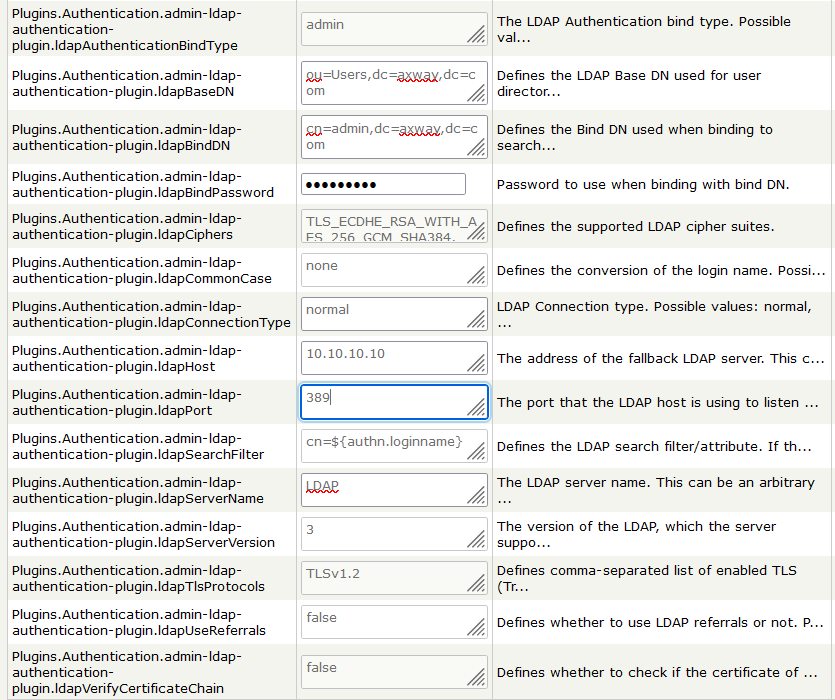
To configure the LDAP authentication plugin sources, set the following options with appropriate values on the Server configuration page:
-
Administrator logs over a plain connection
If you choose normal, then the connection will be non-secure.
ldapConnectionType: normal
ldapPort:389
ldapHost: <IP address>
-
Administrator logs over TLS(ldaps)
TLS(ldaps) or StartTLS connections works if ldapHost matches specific field of the LDAP server certificate:
1. If certificate has SAN.IP and CN, the ldapHost must match either the SAN.IP or the CN.
2. If certificate has SAN.DNS and CN, the ldapHost must match the SAN.DNS.
3. If certificate has no SAN but CN, the ldapHost must match the CN.
It is better to set ldapVerifyCertficateChain:true, and import your LDAP certificate in SecureTransport Trusted CAs.
ldapConnectionType: TLS
ldapPort:636
ldapHost: <CN for the certificate> or ldapHost: <SAN for the certificate>

All other settings doesn't depend on the connection type.
-
Administrator logs over StartTLS
Recommended connection type is StartTLS as TLS(ldaps) is deprecated.
Same conditions mentioned for TLS are applied here.
ldapConnectionType: StartTLS
ldapPort:389
ldapHost: <CN for the certificate> or ldapHost: <SAN for the certificate>

All other settings doesn't depend on the connection type.
Fallback LDAP source configuration options: Authentication against the Secondary (fall-back) server is executed only if the authentication to the primary server fails and the Plugins.Authentication.admin-ldap-authentication-plugin.fallbackLdapHost option is configured.
Create Administrator in SecureTransport
The value of Administrator Name must equal the value of the parameter you set for login.
If you have the following user in your LDAP:
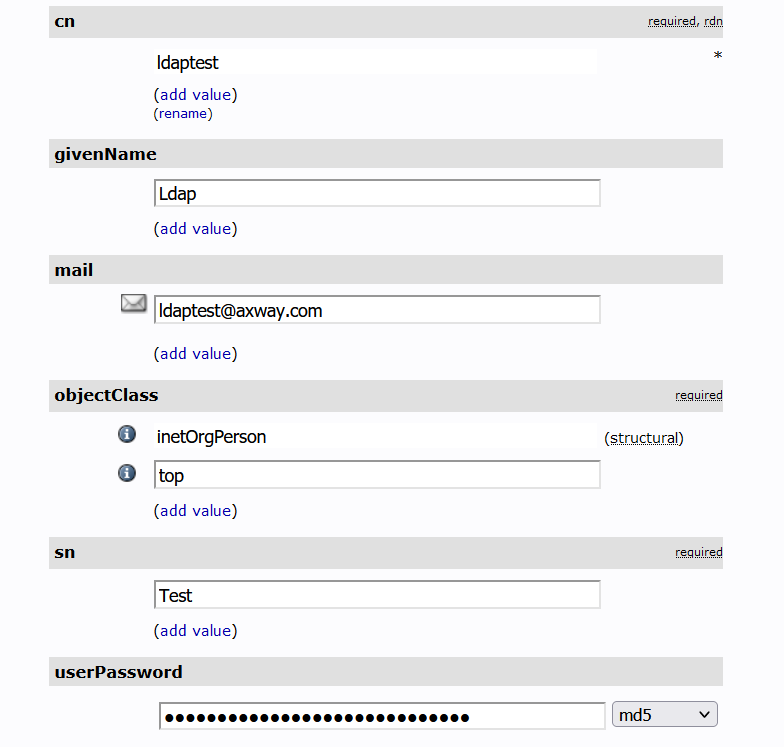
And you selected ldapSearchFilter:cn=${authn.loginname} , then for Administrator Name should be set the value of cn parameter .
Uncheck Password is stored locally and create your administrator.
After a successful login in ST admin with LDAP the following logs can be observed:
Troubleshooting
To enable extended Debug logging, edit <STHOME>/conf/admin-log4j.xml config file. Find the com.axway.st.plugins.authentication logger element and set its level value to DEBUG.
Some common scenarios for troubleshooting:
- CA not imported in the Secure Transport Trusted CA and ldapVerifyCertificateChain:true

- To resolve this you should import your CA in Secure Transport : Setup → Certificates → Trusted CAs
- TLS or StartTLS as connectionn type and hostname not defined in either CN or SAN of the certificate

- To resolve this you need to check your end-entity certificate attributes and set the hostname to corresponds to what is defined
Known issues and Limitations
Administrators with externally saved password cannot use ST certificate or dual authentication.