Via the Axway Composer Broadcast Agent, you transfer objects from the design environment to the run-time environment.
The Broadcast Agent manages the following broadcast operations:
You can either launch broadcast operations from the navigator pane or you can create a new broadcast in the Broadcast Browser.
In both case, the Broadcast Browser enables you to:
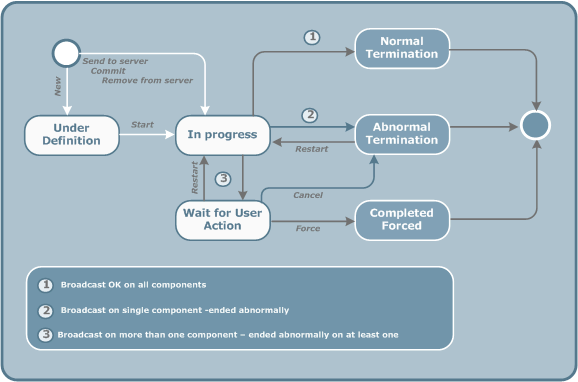
When you create a Send to Server broadcast object, the possible broadcast statuses are as illustrated in the following diagram.
The broadcast status can be any of the following:
 Under Definition: the new broadcast object is
created.
Under Definition: the new broadcast object is
created.
 In Progress: the broadcast
operation is started.
In Progress: the broadcast
operation is started. Normal Termination: the
broadcast operation was successful on all Servers.
Normal Termination: the
broadcast operation was successful on all Servers.  Abnormal Termination:
the broadcast operation failed on all Servers.
Abnormal Termination:
the broadcast operation failed on all Servers. Wait For User Action:
the broadcast operation involves more than one Server and failed on at
least one of them.
Wait For User Action:
the broadcast operation involves more than one Server and failed on at
least one of them. Forced: the broadcast
operation was manually forced on a Server in error.
Forced: the broadcast
operation was manually forced on a Server in error.The following examples illustrate what can happen during a Send to Server operation for a Transfer CFT Channel and for an Integrator Integration.
When you send a Transfer CFT Channel to Server, the configuration is sent to two Servers. The Channel status changes to BroadcastInProgress.
If the broadcast is successful on both Servers:
If the broadcast is unsuccessful on both Servers:
If the broadcast is successful on one Server but not the other:
When you send a Axway Integrator Integration-Task to Server, you send the configuration to a single Server. The Integration-Task status changes to Broadcast in Progress.
If the broadcast is successful on the Server:
If the broadcast is unsuccessful on the Server: