
About revision management and object dependencies
Creating a revision of an object that uses other objects
Creating a revision of an object that is used by another object
Creating a revision of an object that is used by more than one object
Axway Composer objects typically reuse other objects and exist in a hierarchy of object dependencies.
Because Composer objects are inter-dependent, the result of the Upgrade operation depends on where the object is positioned in the hierarchy.
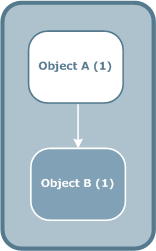
For example, object A is an object that you can send to Server on an Axway Server. Object A uses object B, for example a Map-Broker that uses a Business-Document.
When you send object A to Server, object B is also automatically sent to Server on the same Axway Server. The status of both objects passes to Committed.
However, if you detect a problem in one of the objects, you create a new revision of that object.
Object A uses object B in the object hierarchy, but is not used by any other object.
If you create a new revision of object A, Composer:
The status of revision [1] of objects A and B is still Committed, as illustrated in the following diagram.
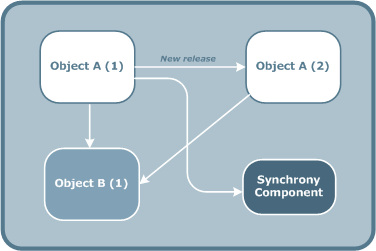
If you then send object A[2] to Server:
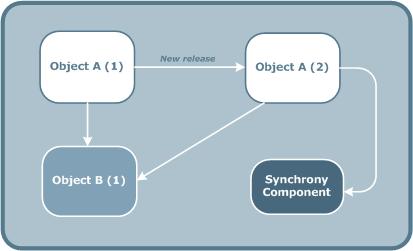
Object B is used by object A in the hierarchy. When you send object A to Server, Composer also automatically sends object B to Server. Both objects have the status Committed.
If you detect a problem to be corrected in object B, create a new revision of object B. Composer:
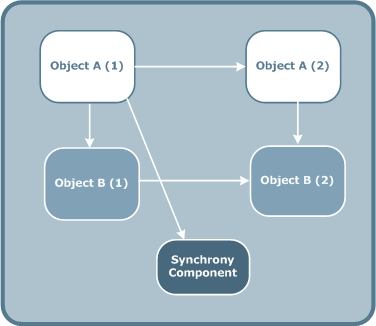
If you start the BroadcastGroup that contains object A[2]:
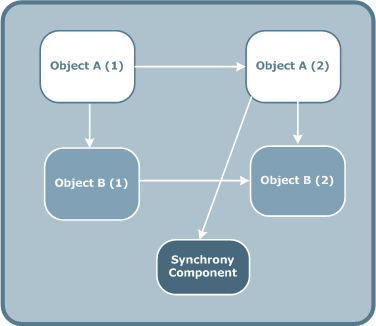
In the following example, object A uses object B.
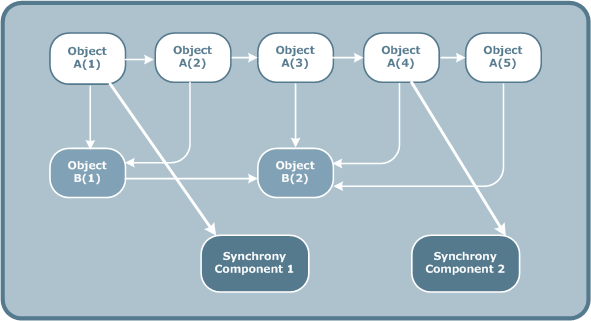
The following operations were performed to create this situation:
When you create a new revision of an object, Composer creates:
In the following example, object A, D and C all use object B.
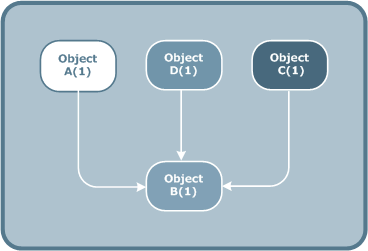
The following diagram illustrates what happens when you create a new revision of object B.
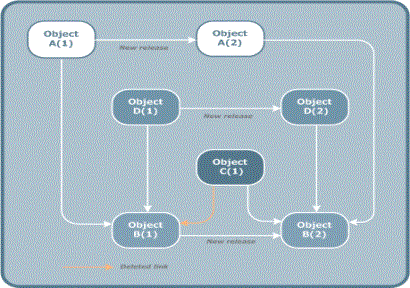
When you create a new revision of B[1], Composer:
Note: If A[1] and D[1] are on the same Axway Server, Composer also creates a BroadcastGroup for the objects B[2], C[1], A[2], D[2].
In such a scenario, the network of object dependencies can become increasingly complex. Because Composer must maintain the coherence of the inter-dependencies, it may be impossible to delete an object revision or send an object to Server. The BroadcastGroup helps maintain integrity of inter-dependent objects and avoid situations where the configuration is no longer coherent.
For details, see Revision management rules.