Locked objects and dependencies
The object locking mechanism ensures that users do not make conflicting modifications to objects by working on them simultaneously. When you open an object properties window, the object is locked, that is, available in read only mode to all other users. When another user tries to access the object, a message is displayed indicating which user is currently working on the object.
However, the Composer administrator has the right to view all objects locked by a given user and to unlock one or more of those objects as required. For example, if a user leaves an object open without exiting Composer, the object remains unavailable to all other users until the object is unlocked by the administrator.
Composer objects exist in an inter-linked network of object dependencies. When you modify an object, there is often an impact on the objects that use or that are used by the object.
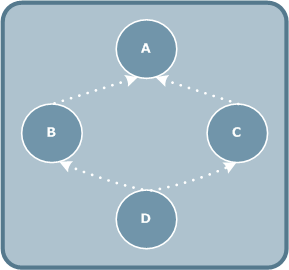
In the following diagram, object A uses objects B and C. In turn, objects B and C both use object D.
Although only one user can work on a given object at a time, several users can work simultaneously on related objects.
When you open an object, for example object B, a warning message is displayed to inform you if another user is currently working on a parent or child object of the current object, for example object D. You can still modify object B, but should be aware that the other user may make modifications to child object D that may have an impact on your modifications to B.
If no child object was modified when you save object B, Composer saves your modifications to object B and closes the object properties window.
However, if another user has modified child object D, Composer refreshes object D in memory and updates object B to take the updates to D into account.
If object B was in Checked status, Composer unchecks the object if necessary. A message informs you that a child object of the current object has been modified and that the modifications have been applied (in memory). The save action is cancelled and current object B is updated.
Use the  button in the navigator
pane to refresh the tree of objects in real time and check for modifications
by another user.
button in the navigator
pane to refresh the tree of objects in real time and check for modifications
by another user.