KB Article #189580
Configuring Dynamic Inbound Header Logging in the Transaction Event Log
Problem
You need to log HTTP headers dynamically in the Transaction Event Log without manually specifying each header in advance.
Resolution
The Transaction Event Log configuration in PolicyStudio can be accessed through:
PolicyStudio -> Server Settings -> Logging -> Transaction Event Log.
While you can manually specify message attributes under the "Select the message attributes to be stored in transaction events" section, there's no out-of-the-box solution to automatically capture all incoming request headers without prior knowledge of their names.
To bypass this limitation, a custom Groovy script can be used to dynamically capture all incoming request headers, sequentially label them (e.g., header-1, header-2, etc.), and store them in a globally accessible format using the msg.putGlobal method.
import com.vordel.mime.HeaderSet
import com.vordel.trace.Trace
import com.vordel.dwe.http.ServerTransaction
def invoke(msg) {
    def client = msg.get("http.client")
    if (client instanceof ServerTransaction) {
        HeaderSet headers = client.getHeaders()
        if (headers != null) {
            Iterator<String> headerNames = headers.getNames()
            int index = 1
            while (headerNames.hasNext()) {
                String headerName = headerNames.next()
                String headerValue = headers.getHeader(headerName)
                String globalKey = "header-" + index
                String formattedValue = headerName + ": " + headerValue
                msg.putGlobal(globalKey, formattedValue)
                index++
            }
        } else {
            Trace.error("No headers found in ServerTransaction.")
        }
    } else {
        Trace.error("Client is not an instance of ServerTransaction.")
    }
    return true
}
To then add the captured headers in Transaction Event Log, navigate to: PolicyStudio -> Server Settings -> Logging -> Transaction Event Log, and In the "Select the message attributes to be stored in transaction events" section, add the dynamically generated headers. You will need to specify each header in the format header-1, header-2, etc. as shown below:
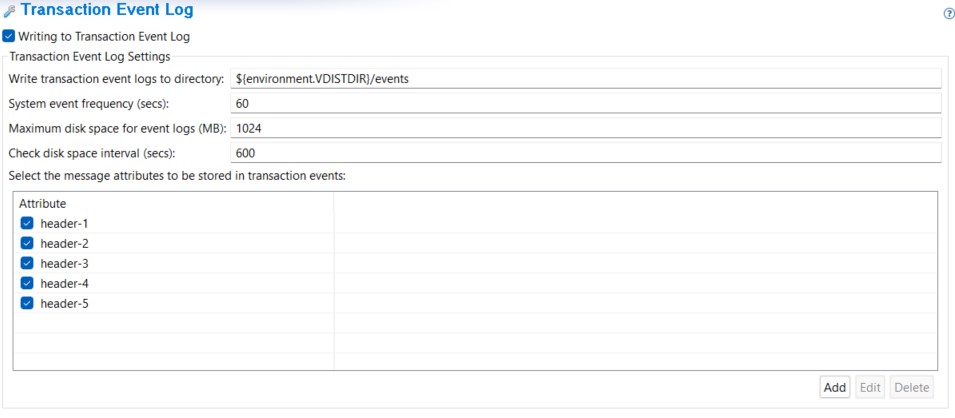
Once configured, the headers will be displayed in the Transaction Event Log in the following format:
"customMsgAtts":{"header-4":"Content-Type: application/xml", "header-5":"test: test", "header-2":"Authorization: Basic YWRtaW46Y2hhbmdlbWU=", "header-3":"Cache-Control: no-cache", "header-1":"Accept: */*"}
Note: It is recommended to test the Groovy script in lower environments before deploying it to production. This is to ensure that the script does not degrade the performance of your system due to the dynamic capture and logging of headers.