KB Article #177863
Not able to access Application using InternetExplorer when HTTPS is set.
Problem
You used to access your Decision insight application with HTTP protocol (by default on port 8080). You decide to set the HTTPS on your Decision insight installation to secure access.
You have followed the documentation relative to HTTPs available at this link: https://techweb.systar.com/public/display/DOCTND/E...
After checking the security is set , and no error is present in the tornado.log, you are not able to access the application by using HTTPS or HTTP. HTTP is by default forwarded to HTTPS. If you unset the HTTPS (in conf/platform.properties -> org.apache.felix.https.enable=false) and restart, you able to access it again.
This is linked to the protocol used to communicate between you browser and your Decision Insight application.

Resolution
In Internet Explorer, you need to check that the Protocole TLS 1.2 is configured (and available). For instance, in Old version of Internet Explorer like IE8, the TLS 1.2 is not present.
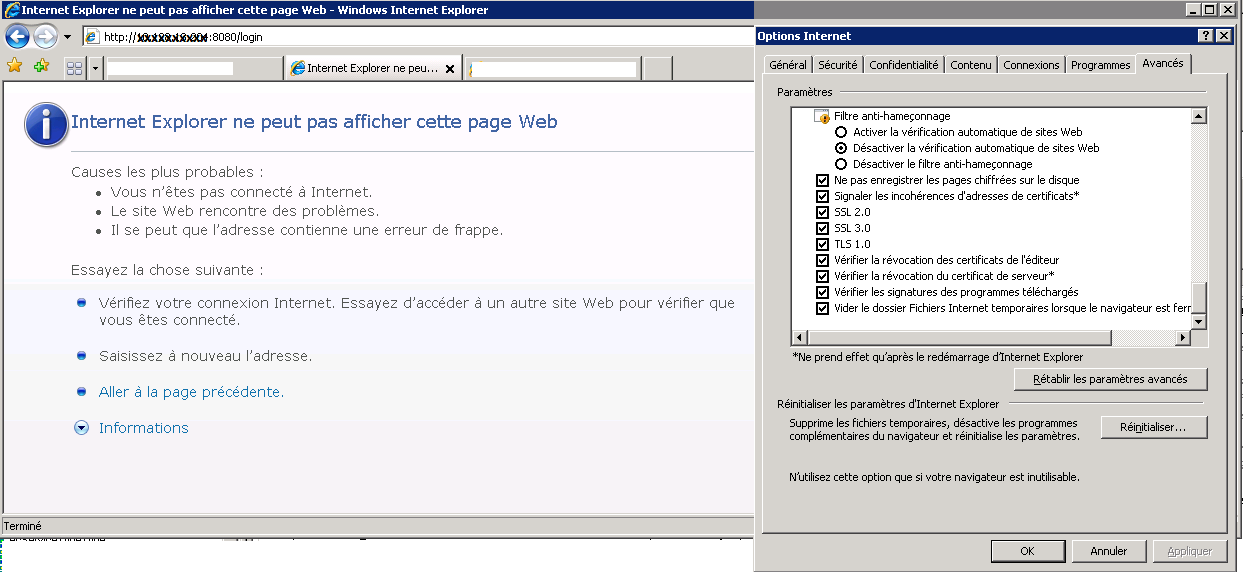
you have 2 possibilities :
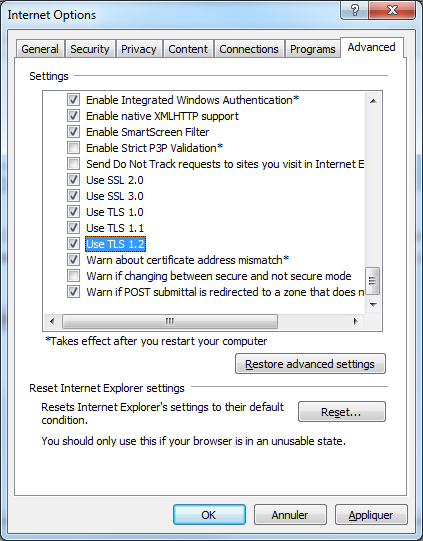
- a secure one : update you InternetExplorer to have a version where TLS 1.2 in present (IE11 or above) and set it : Internet Options > advanced : in security section, check the TLS1.2 option.
- an insecure one : Change the authorized protocol to add other(s) TLS like TLS 1.0. In the file conf/platform.properties you can define the protocol to use. By default the line is: org.apache.felix.https.jetty.protocols.excluded=${com.systar.platform.protocols.excluded}. you can change it to (for instance you wants to allow only TLS1.1) org.apache.felix.https.jetty.protocols.excluded=SSLv3,TLSV1.0,TLS1.2