KB Article #178292
Allow plain FTP only for particular ST users based on IP address
Problem
One can allow plain FTP only for the users from the internal network and enforce FTPS for the external accounts. This could be done based on the source IP addresses, from which the internal users will be connecting. This KB provides the required steps to configure ST for the that purpose.
Resolution
1. Create new user class for the users from the internal network under Admin UI > Access > User Classes. For “User Type”, “User Name” and “User Group” select “*” and for “From Address” select the IP range that should be allowed to use plain FTP. Wildcards are allowed, for example 192.168.1.*
When the Class is created, enable it and move it to the top of the list. This is important, since ST will assign the top-most Class that a user matches into, so if a user matches both the "InternalUsersClass" and the "VirtualUsers" classes, ST will select the one that sits higher on the list.

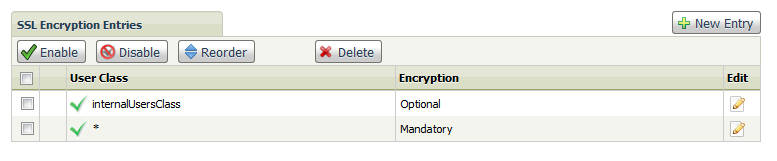
2. Go to Admin UI > Access > Secure Socket Layer page. Under the section SSL Encryption Entries change the value for the User Class “*” to Mandatory.
3. On the same page and section, create a new rule from the “New Entry” button and select the User Class that was created in step 1. For encryption level select Optional.
4. Enable the new created rule.
5. Restart the FTP service from Admin UI > Operations > Server Control to apply the changes