KB Article #180509
Passive FTP configuration parameters missing from the ConfigurationOption database table
Problem
In some rare situations due to reasons yet to be determined, 3 configuration option parameters disappear from the database ConfigurationOption table. The parameters are:
Ftp.PassiveAddr
Ftp.PassiveBase
Ftp.PassiveSpan
The issue usually appears after a major upgrade from ST 5.3.6 to ST 5.4.0 and the install.log file will not help to identify the root cause.
Known issues
The missing parameters cause the following two known issues:
- The Setup -> FTP Settings page in the Admin UI will not load
- The extended Server Control page will appear broken
Issue One: Symptoms
The AdminUI -> Setup -> FTP Settings page will not load and an error message Internal Server Error will be displayed instead.
The following errors will be observed in the Server Log page:

The following exception will be thrown in the $FILEDRIVEHOME/tomcat/admin/logs/catalina.out log file:
Sep 06, 2019 4:08:40 PM org.apache.catalina.core.StandardWrapperValve invoke
SEVERE: Servlet.service() for servlet [jsp] in context with path [/coreadmin] threw exception [javax.servlet.jsp.JspException: An unexpected error occurred while handling the custom table tag.] with root cause
java.lang.NullPointerException
        at com.tumbleweed.tda.tags.table.TableTag.doStartTag(TableTag.java:269)
        at org.apache.jsp.configuration.ftpSettings_jspx._jspService(ftpSettings_jspx.java:420)
        at org.apache.jasper.runtime.HttpJspBase.service(HttpJspBase.java:70)
        at javax.servlet.http.HttpServlet.service(HttpServlet.java:848)
        at org.apache.jasper.servlet.JspServletWrapper.service(JspServletWrapper.java:439)
        at org.apache.jasper.servlet.JspServlet.serviceJspFile(JspServlet.java:395)
        at org.apache.jasper.servlet.JspServlet.service(JspServlet.java:339)
        at javax.servlet.http.HttpServlet.service(HttpServlet.java:848)
        at org.apache.catalina.core.ApplicationFilterChain.internalDoFilter(ApplicationFilterChain.java:303)
        at org.apache.catalina.core.ApplicationFilterChain.doFilter(ApplicationFilterChain.java:208)
        at org.apache.tomcat.websocket.server.WsFilter.doFilter(WsFilter.java:52)
        at org.apache.catalina.core.ApplicationFilterChain.internalDoFilter(ApplicationFilterChain.java:241)
        at org.apache.catalina.core.ApplicationFilterChain.doFilter(ApplicationFilterChain.java:208)
        at com.axway.defence.servlet.filter.HstsFilter.doFilter(HstsFilter.java:199)
        at com.tumbleweed.st.server.util.tomcat.filters.HstsFilter.doFilter(HstsFilter.java:59)
        at org.apache.catalina.core.ApplicationFilterChain.internalDoFilter(ApplicationFilterChain.java:241)
        at org.apache.catalina.core.ApplicationFilterChain.doFilter(ApplicationFilterChain.java:208)
        at com.tumbleweed.st.server.admin.util.ClickjackingProtectionFilter.doFilter(ClickjackingProtectionFilter.java:32)
        at org.apache.catalina.core.ApplicationFilterChain.internalDoFilter(ApplicationFilterChain.java:241)
        at org.apache.catalina.core.ApplicationFilterChain.doFilter(ApplicationFilterChain.java:208)
        at com.tumbleweed.st.server.admin.util.ErrorHandlingFilter.doFilter(ErrorHandlingFilter.java:49)
        at org.apache.catalina.core.ApplicationFilterChain.internalDoFilter(ApplicationFilterChain.java:241)
        at org.apache.catalina.core.ApplicationFilterChain.doFilter(ApplicationFilterChain.java:208)
        at org.owasp.csrfguard.CsrfGuardFilter.doFilter(CsrfGuardFilter.java:74)
        at com.tumbleweed.st.server.admin.ui.csrf.WhitelistUserAgentCsrfGuardFilter.doFilter(WhitelistUserAgentCsrfGuardFilter.java:44)
        at org.apache.catalina.core.ApplicationFilterChain.internalDoFilter(ApplicationFilterChain.java:241)
        at org.apache.catalina.core.ApplicationFilterChain.doFilter(ApplicationFilterChain.java:208)
        at org.apache.catalina.core.StandardWrapperValve.invoke(StandardWrapperValve.java:219)
        at org.apache.catalina.core.StandardContextValve.invoke(StandardContextValve.java:110)
        at org.apache.catalina.authenticator.AuthenticatorBase.invoke(AuthenticatorBase.java:607)
        at org.apache.catalina.core.StandardHostValve.invoke(StandardHostValve.java:169)
        at org.apache.catalina.valves.ErrorReportValve.invoke(ErrorReportValve.java:103)
        at org.apache.catalina.authenticator.SingleSignOn.invoke(SingleSignOn.java:321)
        at org.apache.catalina.core.StandardEngineValve.invoke(StandardEngineValve.java:116)
        at org.apache.catalina.connector.CoyoteAdapter.service(CoyoteAdapter.java:445)
        at org.apache.coyote.http11.AbstractHttp11Processor.process(AbstractHttp11Processor.java:1115)
        at org.apache.coyote.AbstractProtocol$AbstractConnectionHandler.process(AbstractProtocol.java:637)
        at org.apache.tomcat.util.net.JIoEndpoint$SocketProcessor.run(JIoEndpoint.java:318)
        at java.util.concurrent.ThreadPoolExecutor.runWorker(ThreadPoolExecutor.java:1149)
        at java.util.concurrent.ThreadPoolExecutor$Worker.run(ThreadPoolExecutor.java:624)
        at org.apache.tomcat.util.threads.TaskThread$WrappingRunnable.run(TaskThread.java:61)
        at java.lang.Thread.run(Thread.java:748)
Issue Two: Symptoms
The extended view of the Server Control page in the AdminUI (introduced in ST 5.4 Patch 7 and enabled with the Server Configuration option ServerControl.ExtendedUI.Enabled) will appear broken, as shown on the below screenshot:
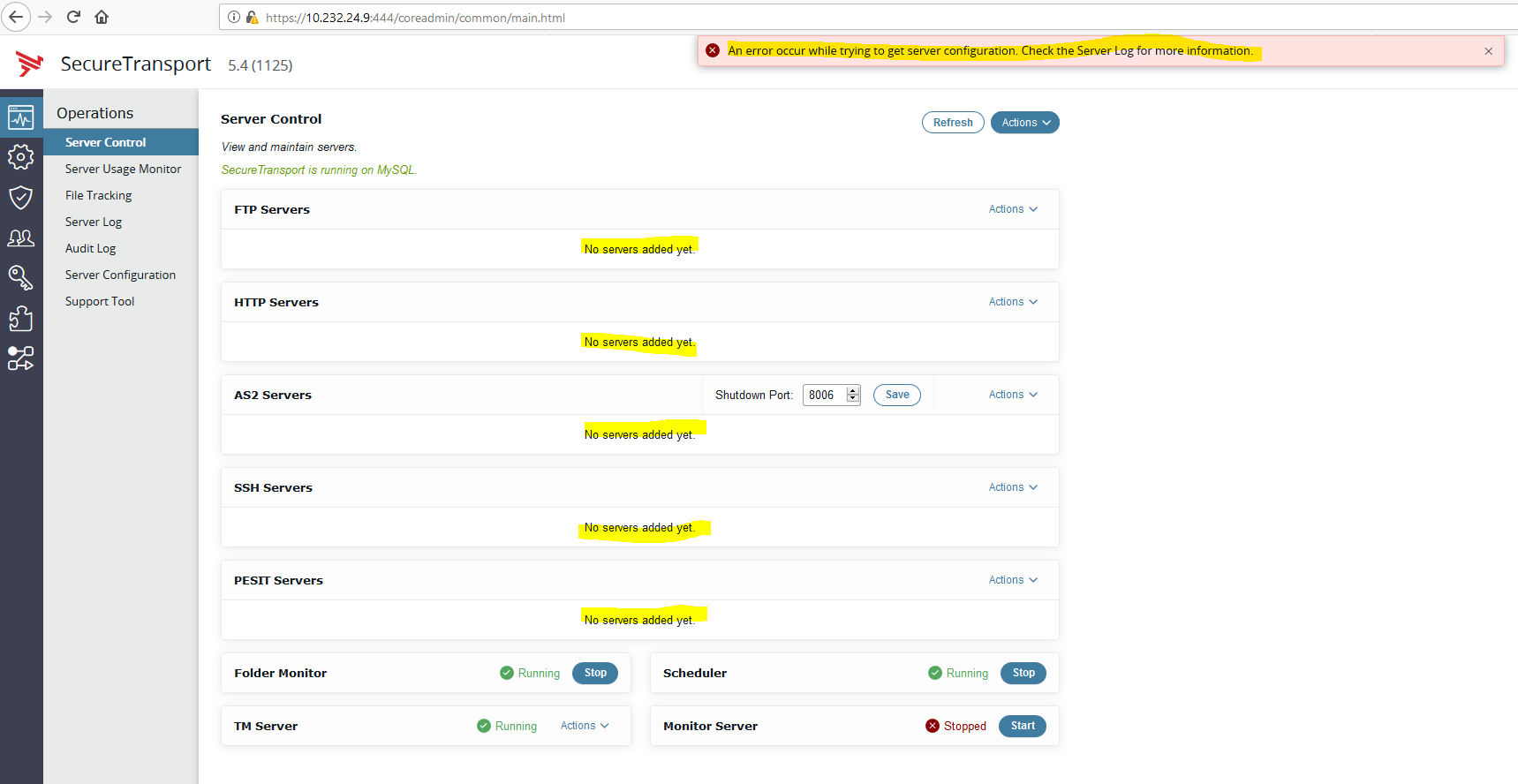
The following errors will be observed in the Server Log page:

Resolution
The missing configuration parameters must be added to the database. They can be inserted in the ConfigurationOption table with the values for each field as described below:
NAME=Ftp.PassiveAddr
NODE=<see note below in red>
COMPOSITE=0
DESCRIPTION=FTP passive address. If not set - the value field is empty. You can edit it from Setup->FTP Settings.
DISABLED=1
ENCRYPTED=0
READONLY=1
SPECIFIED=1
VALUE=
PROFILE=708954718

NAME=Ftp.PassiveBase
NODE=<see note below in red>
COMPOSITE=0
DESCRIPTION=Passive mode base port, 0 means let system choose port.
DISABLED=0
ENCRYPTED=0
READONLY=1
SPECIFIED=1
VALUE=0
PROFILE=708954718

NAME=Ftp.PassiveSpan
NODE=<see note below in red>
COMPOSITE=0
DESCRIPTION=Passive mode port range, 0 means there are no port range restrictions.
DISABLED=0
ENCRYPTED=0
READONLY=1
SPECIFIED=1
VALUE=0
PROFILE=708954718
Note that the NODE=UNSPECIFIED pair is only for Standard cluster. For LEC you must insert similar records for each node with the relevant node IDs taken from your database.
To insert the missing records use the following three SQL queries tested on MySQL and Oracle:
INSERT INTO ConfigurationOption (name, node, composite, description, disabled, encrypted, readOnly, specified, value, profile)
VALUES ('Ftp.PassiveAddr', 'UNSPECIFIED', 1, 'FTP passive address. If not set - the value field is empty. You can edit it from Setup->FTP Settings.', 1, 0, 1, 1, '', 708954718);
INSERT into ConfigurationOption (name, node, composite, description, disabled, encrypted, readOnly, specified, value, profile)
VALUES ('Ftp.PassiveBase', 'UNSPECIFIED', 0, 'Passive mode base port, 0 means let system choose port.', 0, 0, 1, 1, '0', 708954718);
INSERT into ConfigurationOption (name, node, composite, description, disabled, encrypted, readOnly, specified, value, profile)
VALUES ('Ftp.PassiveSpan', 'UNSPECIFIED', 0, 'Passive mode port range, 0 means there are no port range restrictions.', 0, 0, 1, 1, '0', 708954718);
A restart of the ST services will be required to reload the configuration.