KB Article #179543
How to setup SecureClient X11 forwarding
Problem
This article will provide the needed steps to configure SecureClient 6.3 to work with X11 forwarding on a Linux machine.
Resolution
Follow the below steps on the Linux machine where SC is installed
1. Edit the /etc/sshd_config file and make sure the following options are present
AllowAgentForwarding yes
AllowTcpForwarding yes
X11Forwarding yes
2. Restart the OS-native SSH server so changes take effect (i.e. run service sshd restart)
Follow the below steps on the client Windows computer
1. Download and install Xming X Server for Windows (link to Sourceforge).
2. Once Xming is installed, start XLaunch and follow the next several screenshots:
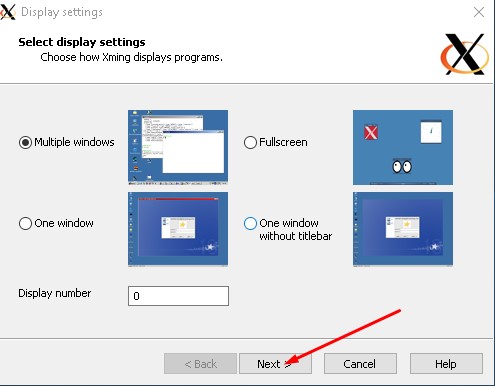
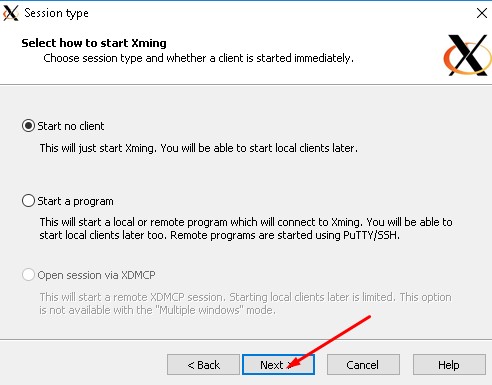
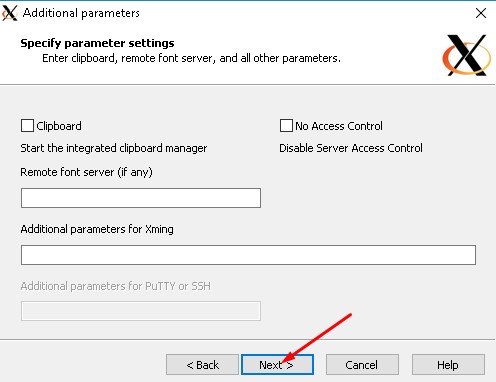
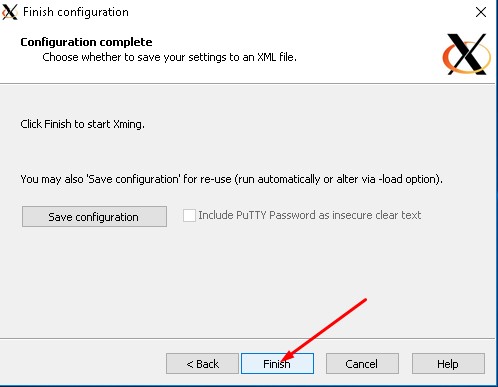
3. When ready, open PuTTY and set it up as shown in the following screenshot:
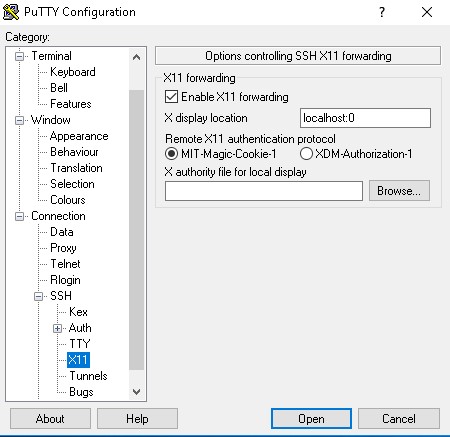
4. Login to the Linux box where SecureClient is installed
5. Start SecureClient