KB Article #180685
Report for inbound TLS connection's version
Problem
Many customers need to deprecate TLS versions with time. In some cases they would like to know and if needed to notify their partners that they would not be able to connect starting XX/XX/XXXX if they are still using old version of TLS that will be deprecated. For this reason our customers would like to get a report on who is connecting to them over TLS and what version of TLS they are using.
Resolution
The best way is to setup a policy which looks like this:
IF
message headers ('Received') contain: any entry in the list: 'TLS1.2'
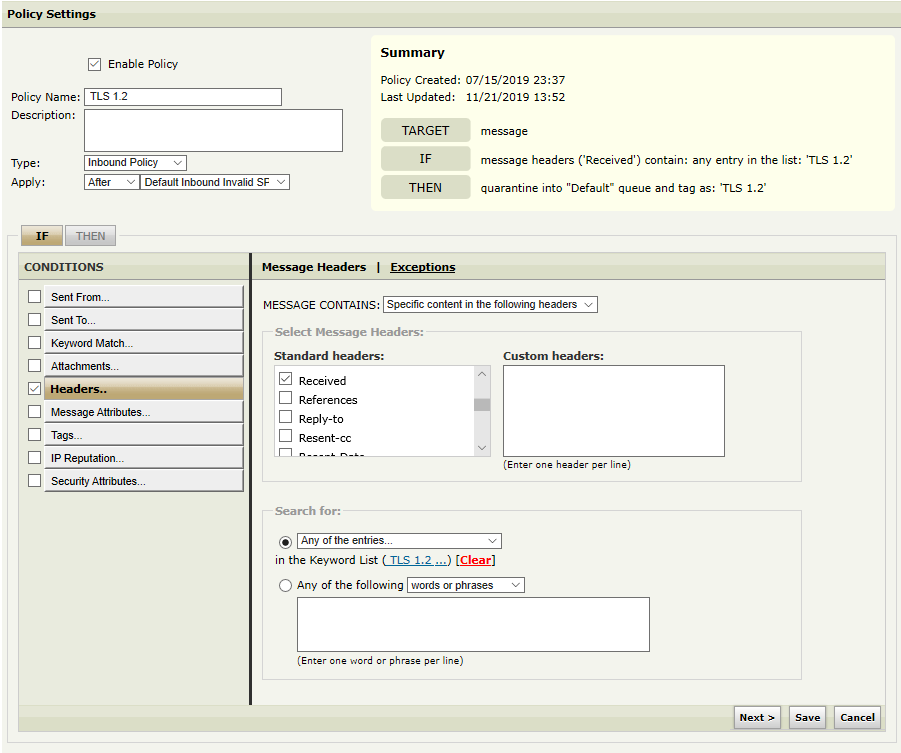
Where the list contains the following regex (set it to regex as default is word/phrase and not going to work):
(using)(\s)(TLSv1\.2)(.*)(<host[1-3]\.bobby\.com>).
This will catch all the message which were received by the host in the regex (the MG hostname) and TLS 1.2 was used. In this case the matching hostnames will be 1.bobby.com or 2.bobby.com or 3.bobby.com. You need to replace
<host[1-3]\.bobby\.com>
with the hostname/s of the MailGate/s which will be doing the inspection.
THEN
tag as: 'TLS 1.2' and continue processing
Putting a tag makes it very easy for reporting. One can use the message tracking to find all such messages, export them into CSV with sender, recipient, date/time and size as well. You will need 1 separate policy for each version you would like to track. Example of the regex for TLS 1.0 and 1.1 is as follows:
(using)(\s)(TLSv1\.1)(.*)(<host[1-3]\.bobby\.com>)
(using)(\s)(TLSv1\s)(.*)(<host[1-3]\.bobby\.com>)
Numbers also can be pulled from the policy execution report as well to get an idea on what % of your traffic is using what version of TLS. To be most accurate create a policy that there was none of the above headers to see also who is NOT using TLS for example.
This will also be preserved in the configuration when you upgrade unlike custom changes from the backend that needs to be redo every time.