KB Article #181901
How to disable old TLS\SSL versions on CentOS
Problem
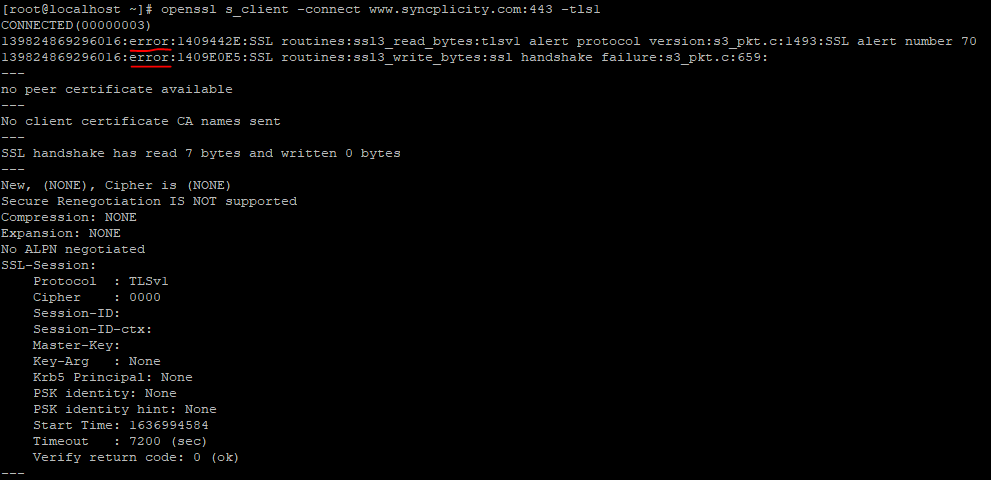
A Linux-based device accepts older TLS or SSL protocol version connections. The connection can be tested with:
openssl s_client -connect yourserver.com:443 -tls1
where:
-tls1 is TLS 1.0
-tls1_1 is TLS 1.1
-tls1_2 is TLS 1.2
-ssl3 SSL 3
Example of an unsuccessful connection:
Example of a successful connection:

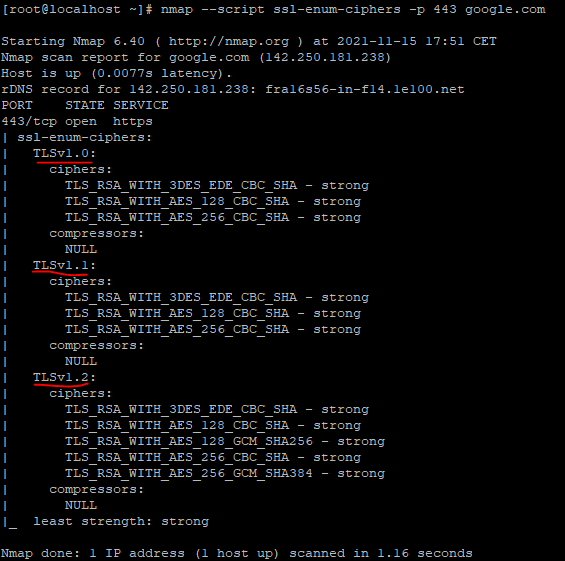
If installed, nmap will give a better overview on the supported connection types:
nmap -script ssl-enum-ciphers -p 443 yourserver.com
Resolution
For Syncplicity CentOS 7.x based components, the supported TLS versions are set in the JAVA environment. The accepted/declined SSL/TLS versions are set in:
/usr/lib/jvm/java-1.8.0-openjdk-1.8.0.292.b10-1.el7_9.x86_64/jre/lib/security/java.security
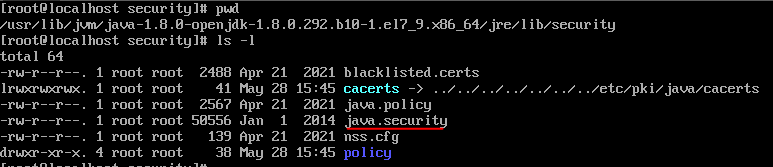
The disabled protocol versions are set in the java.security file in property jdk.tls.disabledAlgorithms. The versions to be disabled need to be added there, like TLSv1 and TLSv1.1 in the example below:

The JAVA based services needs to be restarted for the changes to take effect - you can use 'systemctl restart syncp-storage'
Notice
- the commands/changes require root access, so make sure you are logged in as root or use the 'sudo' command accordingly
- the path /usr/lib/jvm/java-1.8.0-openjdk-1.8.0.292.b10-1.el7_9.x86_64/.... might vary for other JAVA versions in use. Please adopt accordingly.