KB Article #182629
REST API: Using the PATCH method to update an Account
Problem
There could be an "Error validating request" error message returned from the API if the PATCH method is used to update an Account more than once, and the below configuration is present:
the Account has a "Login Restriction Policy" assigned
the Account belongs to a Business Unit with the settings
"Allow Delivery Method modifying" set to enabled
"Delivery Method" set to non-default (Anonymous or Account Without Enrollment or Account With Enrollment)
"Implicit Enrollment Type" set to any option other than "Selected by Sender"
"Allow Login Restriction Policy modifying" set to enabled
Resolution
Commands for disabling or locking an Account in this specific situation when the error message below is encountered:
"message" : "Error validating request",
"validationErrors" : [ "Implicit enrollment type is not allowed" ]
Disabling an Account
curl -k -u ADMINUSER:ADMINPASS -X PATCH' 'https://HOSTNAME:ADMINPORT/api/v2.0/accounts/user?ownershipChangeMode=recursive' -H 'accept: */*' -H 'Content-Type: application/json' -d "[{\"op\":\"replace\",\"path\":\"/disabled\",\"value\":\"true\"},{\"op\": \"replace\",\"path\": \"/adhocSettings\",\"value\": {\"implicitEnrollmentType\":null}}]"
Locking an Account
curl -k -u ADMINUSER:ADMINPASS -X 'PATCH' 'https://HOSTNAME:ADMINPORT/api/v2.0/accounts/user?ownershipChangeMode=recursive' -H 'accept: */*' -H 'Content-Type: application/json' -d "[{\"op\":\"replace\",\"path\":\"/user/locked\",\"value\":\"true\"},{\"op\": \"replace\",\"path\": \"/adhocSettings\",\"value\": {\"implicitEnrollmentType\":null}}]"
To enable or unlock an Account, replace the true with false in the commands. Keep in mind that using null for the value of implicitEnrollmentType will not update the value of the field. If changes are made from the Admin UI the implicitEnrollmentType return to its original value which is indeed null as when hitting the error with API PATCH the value could change to ANONYMUS_LINK.
If the above described configuration is not present, then the commands below can be used for disabling or locking an Account.
Disabling an Account
curl -k -u ADMINUSER:ADMINPASS -X PATCH' 'https://HOSTNAME:ADMINPORT/api/v2.0/accounts/user?ownershipChangeMode=recursive' -H 'accept: */*' -H 'Content-Type: application/json' -d "[{\"op\":\"replace\",\"path\":\"/disabled\",\"value\":\"true\"}]"'
Locking an Account
curl -k -u ADMINUSER:ADMINPASS -X PATCH' 'https://HOSTNAME:ADMINPORT/api/v2.0/accounts/user?ownershipChangeMode=recursive' -H 'accept: */*' -H 'Content-Type: application/json' -d "[{\"op\":\"replace\",\"path\":\"/user/locked\",\"value\":\"true\"}]"
A GET API request can be used to check the current settings of the Account
curl -k -u ADMINUSER:ADMINPASS -X GET' 'https://HOSTNAME:ADMINPORT/api/v2.0/accounts/user?fields=user.locked%2Cname%2CadhocSettings%2CbusinessUnit%2Cdisabled%2CloginRestrictionPolicy&type=user' -H 'accept: application/json'"
The GET command returns the selected fields user.locked, name, adhocSettings, businessUnit, disabled and loginRestrictionPolicy. If needed the filter can be removed by deleting ?fields=user.locked%2Cname%2CadhocSettings%2CbusinessUnit%2Cdisabled%2CloginRestrictionPolicy&type=user.
In the above command replace:
MASTER_ADMINISTRATOR:ADMIN_PASSWORD with the proper master admin credentials
HOSTNAME with the hotname or IP of SecureTransport
ADMINPORT with the port, on which the ST's admin service runs on
Example:
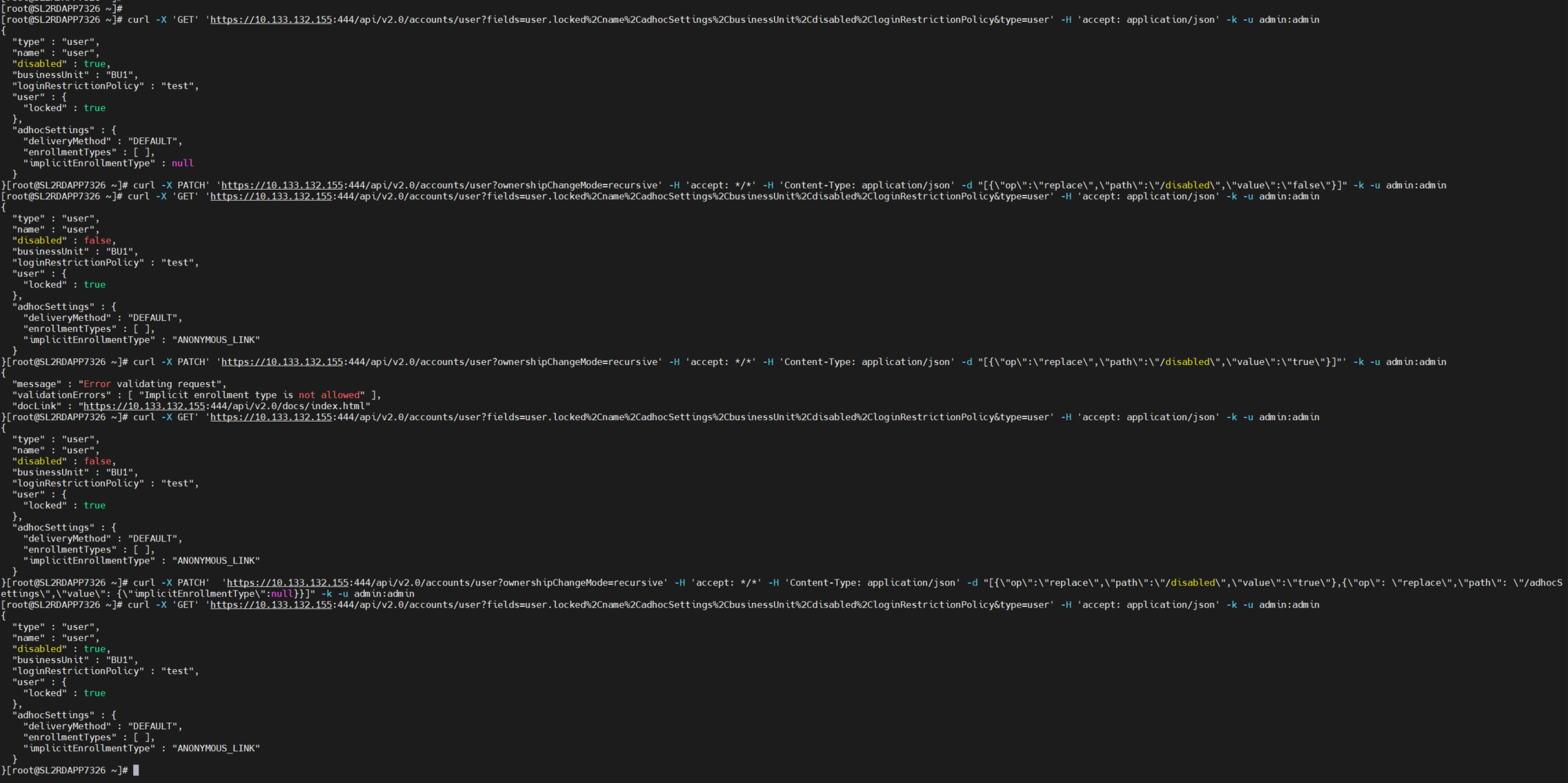
Demonstration of all commands in this article