KB Article #182891
Impossible to reach the job logs with an LDAP/LDAPS user
Problem
- LDAP/LDAPS users cannot reach the job logs from the GUI (a popup is talking about right issue)
- It may work for some time and then never work anymore.
- it is working fine for OPADMIN that is not (and must not be) in LDAP/LDAPS
Root cause
- Even if the Modeling Server has got an access to LDAP/LDAPS, the Production Server (related to job logs to open) have got not access LDAP/LDAPS server. Then, User validation is based only on user details (LDAP cache) shared by the Modeling Server. The user details have got an end time of validation that must be renewed to push back the end time of validation.
- Refresh of user details is not done automatically at Modeling server level and then synchronized to all Production Servers
- Without valid credentials, access to Job logs is then impossible
- OPADMIN is not concerned as it is not a LDAP/LDAPS user
Resolution
- The solution is to match with the prerequisite to have a possible connection between the Production Server a nd LDAP/LDAPS server
- It is possible to workaround this issue on long but temporary term by increasing the end time of validation of the LDAP cache from 00/00:00 to maximum 99/23:59 (99 days and 23h59)
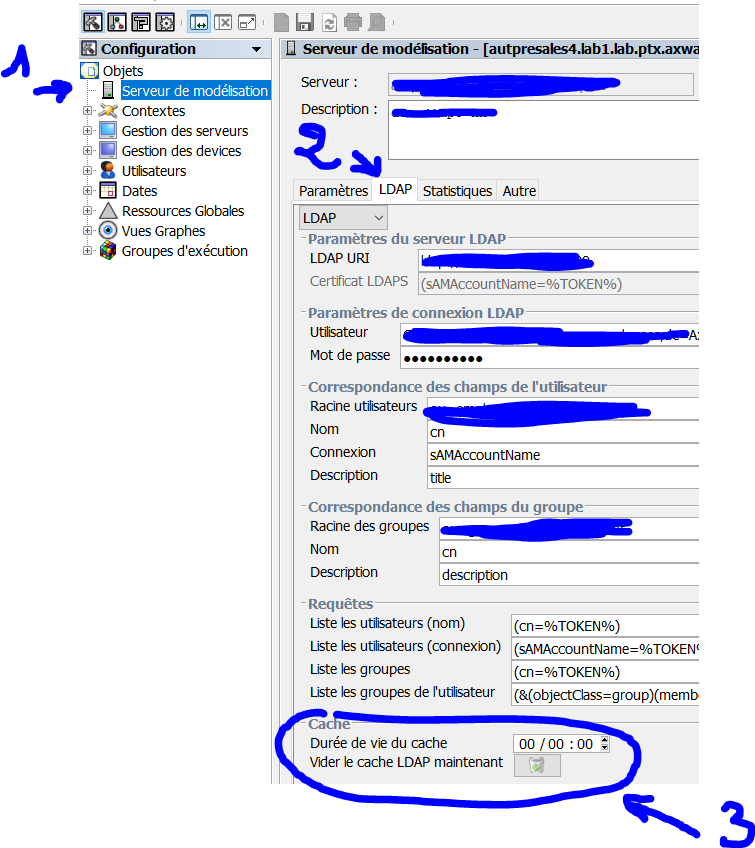
Notice if you are using the workaround:
- Cache must be reset
- you must synchronize this new action to all Production Server