KB Article #191100
Upgrade the Custom Advanced Routing User Interface to latest SecureTransport SDK
Problem
Axway modernised the Route Templates UI in SecureTransport using new technology. As part of this change, the Custom Advanced Routing Steps built with the SDK for SecureTransport 5.5-20220825 will no longer work in the new interface, as the technology is not backward compatible.
What does this mean for you?
- The Custom Routing Steps created with the SDK for SecureTransport 5.5-20220825 will no longer be manageable in the new Route Templates UI pages.
- You can still view and manage them using the legacy UI pages:
- Route Package Templates
- Composite Routes (found under the Accounts menu)
- This legacy support will be removed:
- January 2028 - Last release that supports editing these old steps in the legacy UI.
- February 2028 - The new UI only supports routing steps built using the new method.
What happens if you try to open an old routing step in the new UI?
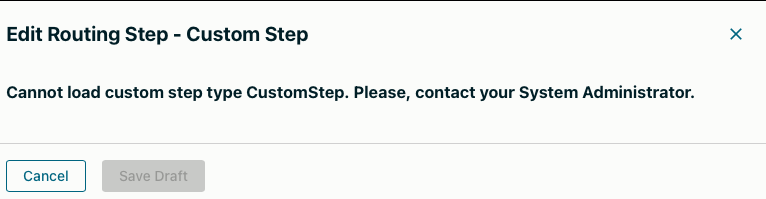
When you open a step created with the old SDK from the new Route Templates page, you will see a side panel message like this. While the step will still function, you’ll only be able to manage it through the REST API, not through the Admin UI.
Resolution
How to Check if You Are Affected?
- Connect to the file system where SecureTransport is installed.
- List the following folder <FILEDRIVE_HOME>/plugins/routingSteps/, where FILEDRIVE_HOME is the ST installation folder.
- If there are files and folders under this directory, you are affected.
Here is an example of a system that is not affected. If that applies to your system, there is no need to continue reading this article.

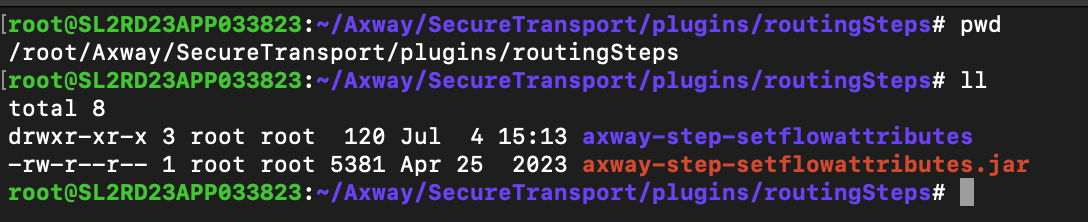
Axway has developed and delivered a single Custom Advanced Routing Step to the repository.axway.com called "Set Flow Attributes AR Step for SecureTransport". If this step is installed on your system, it will be available with a jar "axway-step-setflowattributes.jar" and directory "axway-step-setflowattributes" like this:

A newer version of this plugin will be made available automatically on your system under the <FILEDRIVE_HOME>/plugged directory that supports the new mechanism.
If you have another step under this directory, follow the steps below to upgrade it with the latest SDK.
Starting with SecureTransport March 2025, you can build the Custom Advanced Routing Steps UI following the new mechanism available with SecureTransport-5.5-AdminUI-SDK-1.0.3 or later.
Link to all SecureTransport SDK binaries https://repository.axway.com/catalog?artifactType=SDK&products=a1Ew000000N242nEAB
To upgrade the UI of your Step, follow the README of the last available SDK.
It will walk you through the following process:
- How to establish a connection between your local Development Environment and the SecureTransport server on which the step is available.
- How to navigate inside the SDK Project and find relevant files.
- How to create the new UI Components
- How to test and deploy the new UI for the step
If you would like to learn more about SecureTransport’s custom Advanced Routing Steps, check the Developer Guide: https://docs.axway.com/bundle/SecureTransport_55_DeveloperGuide_allOS_en_HTML5/page/Content/DevelopersGuide/STDeveloperGuideStartPage.htm
To create a new User Interface for your Custom Advanced Routing Steps, download the latest SDK and follow the README instructions:
https://support.axway.com/en/downloads/download-details/id/1471005
End of support dates updated
Initially, the plan was to drop the support in January 2027.
That is now updated, and the new date is January 2028.
Date of the modification: 20 April 2026.