KB Article #194820
Issue upgrading cache configuration that uses environment variables from envSettings.props (only Aug 25, Feb 26 and May 26)
Problem
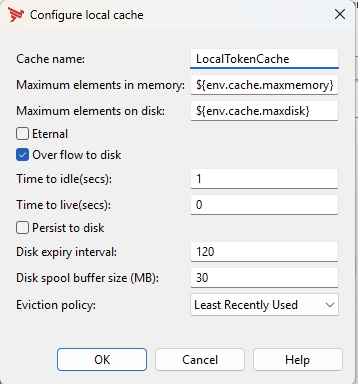
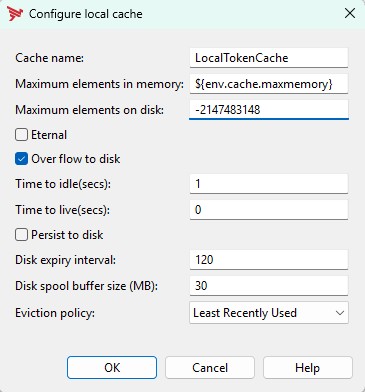
There is known issue with configuration upgrades to versions 7.7.20250830 (Aug 25), 7.7.20260228 (Feb 26) and 7.7.20250530 (May 26) when cache configuration is using environment variables from envSettings.props. If the "maximum elements on disk" is defined in envSettings.props with a substitution like ${env.cache.maxdisk} then the value becomes -2147483148 and broken after the upgrade.
e.g. in Policy Studio
Resolution
The solution in the affected versions is to correction the XML cache upgrade file as below.
For Policy Studio there is a script attached that makes the necessary changes and works for the versions 7.7.20250830,7.7.20260228 and 7.7.20260530. The problem didn't exist before and after these 3 releases.
Policy Studio Linux
$ ~/patch-linux.sh
Usage: ~/patch-linux.sh <jar-directory>
$ ~/patch-linux.sh /opt/Axway-7.7/policystudio/plugins
Created backup: /opt/Axway-7.7/policystudio/plugins/com.vordel.rcp.policystudio_7.7.0.v20260304-0928.jar.bak
Extracting system/conf/migrate/Cache/3.xml from com.vordel.rcp.policystudio_7.7.0.v20260304-0928.jar ...
Patch verified successfully.
SUCCESS: Updated /opt/Axway-7.7/policystudio/plugins/com.vordel.rcp.policystudio_7.7.0.v20260304-0928.jar

Rollback instructions:
  rm -f "/opt/Axway-7.7/policystudio/plugins/com.vordel.rcp.policystudio_7.7.0.v20260304-0928.jar"
  mv -f "/opt/Axway-7.7/policystudio/plugins/com.vordel.rcp.policystudio_7.7.0.v20260304-0928.jar.bak" "/opt/Axway-7.7/policystudio/plugins/com.vordel.rcp.policystudio_7.7.0.v20260304-0928.jar"

startup clean
$ /opt/Axway-7.7/policystudio/policystudio -clean
Policy Studio Windows
> powershell.exe -NoProfile -ExecutionPolicy Bypass -File .\patch-windows.ps1
Usage: .\patch-windows.ps1 <directory-containing-the-jar>
> powershell.exe -NoProfile -ExecutionPolicy Bypass -File .\patch-windows.ps1 "C:\Axway\7.7.20260228\policystudio\plugins\"
Starting patch operation...
Validating directory: C:\Axway\7.7.20260228\policystudio\plugins\
Validating JAR: C:\Axway\7.7.20260228\policystudio\plugins\com.vordel.rcp.policystudio_7.7.0.v20260304-0932.jar
Reading XML entry: system/conf/migrate/Cache/3.xml
Checking patch status...
Creating backup if required...
Created backup: C:\Axway\7.7.20260228\policystudio\plugins\com.vordel.rcp.policystudio_7.7.0.v20260304-0932.jar.bak
Applying patch...
Verifying updated JAR...

SUCCESS: Updated C:\Axway\7.7.20260228\policystudio\plugins\com.vordel.rcp.policystudio_7.7.0.v20260304-0932.jar

Rollback:
  Remove-Item -LiteralPath 'C:\Axway\7.7.20260228\policystudio\plugins\com.vordel.rcp.policystudio_7.7.0.v20260304-0932.jar' -Force
  Move-Item -LiteralPath 'C:\Axway\7.7.20260228\policystudio\plugins\com.vordel.rcp.policystudio_7.7.0.v20260304-0932.jar.bak' -Destination 'C:\Axway\7.7.20260228\policystudio\plugins\com.vordel.rcp.policystudio_7.7.0.v20260304-0932.jar'

startup with
> C:\Axway\7.7.20260228\policystudio\policystudio -clean
API Gateway Servers
Version update: if applying a version update (to one of the 3 affected versions), before running the update script change the following file (found in the extracted update files):-
content/system/conf/migrate/Cache/3.xml at line 19
<code> if ((maxElementsOnDisk <= maxElementsInMemory && maxElementsOnDisk > 0)</code>
The change is > 0 instead of != 0 at the end
Now run the update script and any affected fed configurations will be correctly upgraded.
For upgradeconfig and projupgrade
The change is the same but the file is located here <INSTALL_DIR>/apigateway/system/conf/migrate/Cache/3.xml