KB Article #67579
Upload fails using WinSCP, .filepart files created on disk
Problem
Uploads with WinSCP can sometimes fail and a temporary file with name _FILENAME_.filepart can remain on the ST disk.
Resolution
This issue is a direct consequence of two factors working together:
1. WinSCP uses a temporary name for the uploaded file, which is then renamed to the original file name after the upload completes successfully. This is the default client behavior for all file uploads.
2. File renaming within the same upload session is prohibited in ST by design. For more information see KB 160927.
To overcome the problem, you must re-configure WinSCP to disable the renaming mechanism for uploaded files. Follow the steps below:
1. Go to WinSCP's Tools -> Preferences, then select Transfer -> Endurance.
2. In the Enable transfer resume/transfer to temporary filename for section, select the "Disable" option.
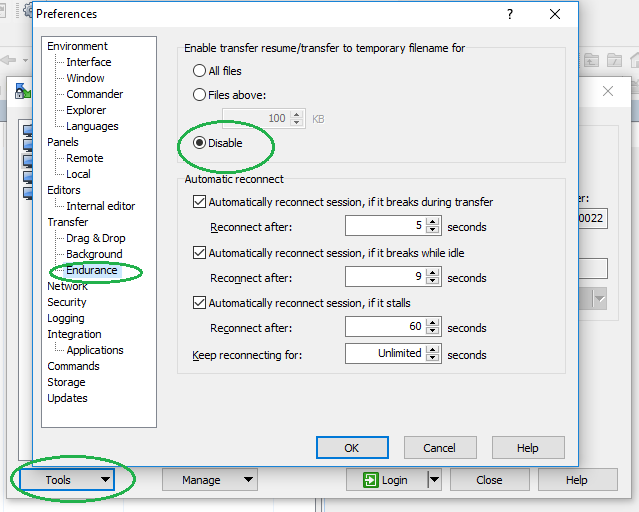
3. Save the settings and try the upload to ST again.