KB Article #180485
Rotate script does not rotate the xferlog and cmdlog files
Problem
After installing Patch 9 for ST 5.4.0 on Windows, the rotate script no longer rotates the xferlog and cmdlog files.
The following messages will be written in the $FILEDRIVEHOME/var/logs/rotate.out log file:
mv: cannot move `/drives/c/Axway/SecureTransport/STServer/var/logs/cmdlog' to `/drives/c/Axway/SecureTransport/STServer/var/db/hist/logs/cmdlog.YYYYMMDD': Device or resource busy
mv: cannot move `/drives/c/Axway/SecureTransport/STServer/var/logs/xferlog' to `/drives/c/Axway/SecureTransport/STServer/var/db/hist/logs/xferlog.YYYYMMDD': Device or resource busy
/drives/c/Axway/SecureTransport/STServer/bin/rotate: line 133: /bin/java: No such file or directory
Resolution
In order to solve the issue you needed to change the line ending of the $FILEDRIVEHOME/bin/funcs.sh file from CRLF to LF.
You can use Notepad++, then open the funcs.sh file, and then convert the line endings from the Edit -> EOL Convertion -> Unix (LF) menu.
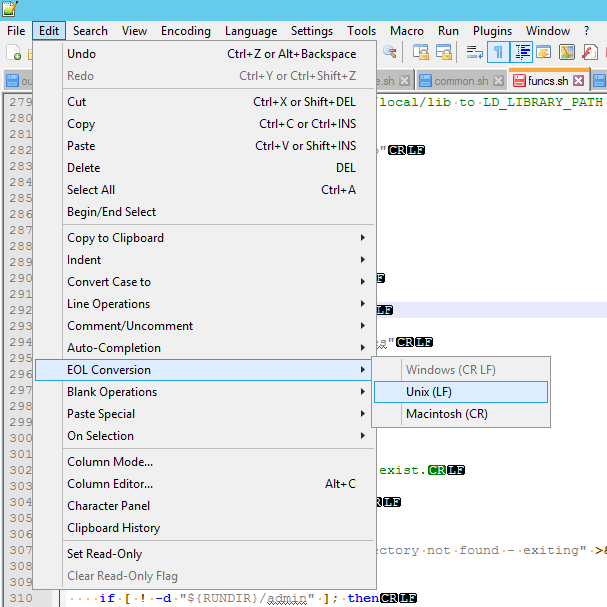
Save the fle and restart ST.