KB Article #180803
How to install and configure the OAuth 2.0 Authentication Plugin for SecureTransport
Introduction
The OAuth 2.0 Authentication plugin allows multiple authentication methods for ST user accounts, account templates and administrator accounts against an Identity Provider service:
• Resource Owner Password Credentials Grant (ROPC) type for HTTP/S, FTP/S, SSH
• HTTP/s Bearer token authentication with Oauth2 or OIDC for end users and administrators
• HTTP/s Authorization code Grant type authentication with Oauth2 or OIDC for end users and administrators
• HTTP/s Implicit Grant type authentication with Oauth2 or OIDC for end users and administrators
Table of contents
- Deploying the plugin
- Troubleshooting
- Limitations and known issues
- Plugin configuration options
- Configuration options (detailed)
- End users authentication
- Administrators authentication
Deploying the plugin
The OAuth Authentication plugin for ST can be downloaded from the Axway Repository.
For complete list of prerequisites and installation instructions, refer to the plugin Readme.md file contained in the plugin archive. The Readme can also be accessed from the plugin download page in the Axway Support Portal.

Verifying the installation
Once the plugin had been deployed, go to the Admin UI → Operations → Server Configuration and search for the Plugins.Authentication.Admin.Registry and Plugins.Authentication.EndUser.Registry configuration options.
Enabling the OAuth Authentication plugin
Important: Before enabling the external authentication plugin, make sure its sources are configured and there is at least one ST administrator account with local credentials, that does not exist in the external authentication sources.
To enable the plugin and authenticate ST Administrator accounts update the value of the Plugins.Authentication.Admin.Registry ST server configuration parameter to oauth-authentication-plugin.
To enable the plugin and authenticate ST enduser accounts update the value of the Plugins.Authentication.EndUser.Registry ST server configuration parameter to oauth-authentication-plugin.
Troubleshooting
For troubleshooting purposes, you can enable debug logging in the dedicated Transaction Manager (TM) logger for the plugin, located in the <FILEDRIVEHOME>/conf/tm-log4j.xml file. Events related to the plugin are available in the Server Log. The configured logger will look like the example below:
<logger name="com.axway.st.plugins.authentication" additivity="false">
        <level value="debug" />
        <appender-ref ref="ServerLog" />
</logger>
To enable debug logging, set the level value to debug. However, change the value with caution. It is recommended to switch to levels different than INFO only temporarily, e.g. during troubleshooting sessions.
Limitations and known issues
For complete list of limitations, refer to the plugin Readme.md file contained in the plugin archive.
Plugin configuration options
The OAuth Authentication plugin for SecureTransport comes with the configuration options described in the following table. Keep in mind:
• All options are prefixed with Plugins.Authentication.oauth-authentication-plugin..
• Each ID Provider requires a different set of options to be configured.
| Setting | Description |
| additionalRedirectString | Additional string to be appended to the redirect URL Login location. |
| authorizationCodeParameter | Name of the HTTP query parameter containing the authorization grant code. Default value is code. Used for Authorization Code flow. |
| authorizationHeader | Name of the HTTP header containing the access token in case of token authentication. Default value is Authorization. |
| authorizationUrl | The URL of the Authorization server endpoint that should be used to obtain authorization grants. |
| cipherSuites | List of supported cipher suites to be used when connecting to the Authorization server over a secure connection. The ciphers must be comma separated. |
| clientId | An ID that identifies SecureTransport as a trusted party against the Authorization Server. Should be obtained from the OAuth2 IdP. |
| clientSecret | A shared secret between SecureTransport and the Authorization Server that is used for authentication of ST against the Authorization Server. The setting is shared between both parties. Should be obtained from the OAuth2 IdP. |
| connectTimeout | The timeout (in milliseconds) after which connection attempt to remote OAuth IdP is considered failed. |
| interactiveResponseType | Grant type to be used for interactive HTTP authentication requiring a REDIRECT. |
| introspectionEndpoint | The URI of the OAuth2.0 introspection endpoint. Required only when tokenVerificationMode is "introspection". |
| keysUrl | The URL of the JSON Web Keys Store endpoint that should be used to obtain the public token signature validation key. |
| oidcEnabled | Enable OpenID Connect support. When enabled, SecureTransport expects to receive and valdiate an ID token instead of an access token. |
| protocols | List of supported secure protocols to be used when connecting to the Authorization server. The protocols must be comma separated. |
| redirectUri | Redirect URI to send with the Authorization code request to obtain an access token. The Authorization server will validate if the redirect URI is the same for which the authorization code was issued. |
| revokeUrl | The URL of the Authorization server endpoint that should receive requests for revoking authorization tokens. |
| scope | The authorization and token endpoints allow the client to specify the scope of the access request using the 'scope' request parameter. In turn, the authorization server uses the 'scope' response parameter to inform the client of the scope of the access token issued. Should be obtained from the OAuth2 IdP. |
| signingKey | Key used to verify the signature of the authorization token. The key must be Base64 encoded and the algorithm used for its creation must be RSA. No other cryptosystem is supported. |
| socketTimeout | The timeout (in milliseconds) ST plugin client waits before considering the reading of a packet from the IdP as timed out. This is in case the connection to the OAuth IdP has been successfully established. |
| tokenUrl | The URL of the Authorization server endpoint that should receive authorization requests. |
| tokenVerificationMode | The type of token verification method. Possible values are: jwt or introspection. jwt - token will be validated as a JSON Web Token. introspection - token will be validated by the Introspection endpoint of the authorization server. The setting is used only when oidcEnabled is set to false. |
| userIdentityAttribute | Name of the attribute containing the user identity in the access token, ID token, token introspection response or HTTP header. |
| useSecure | Whether or not to use secure connection. |
| validateTokenSignature | Whether or not to validate the provided authorization token signature. |
| verifyCertificate | Whether or not to verify the Authorization Server SSL certificate when using a secure connection. |
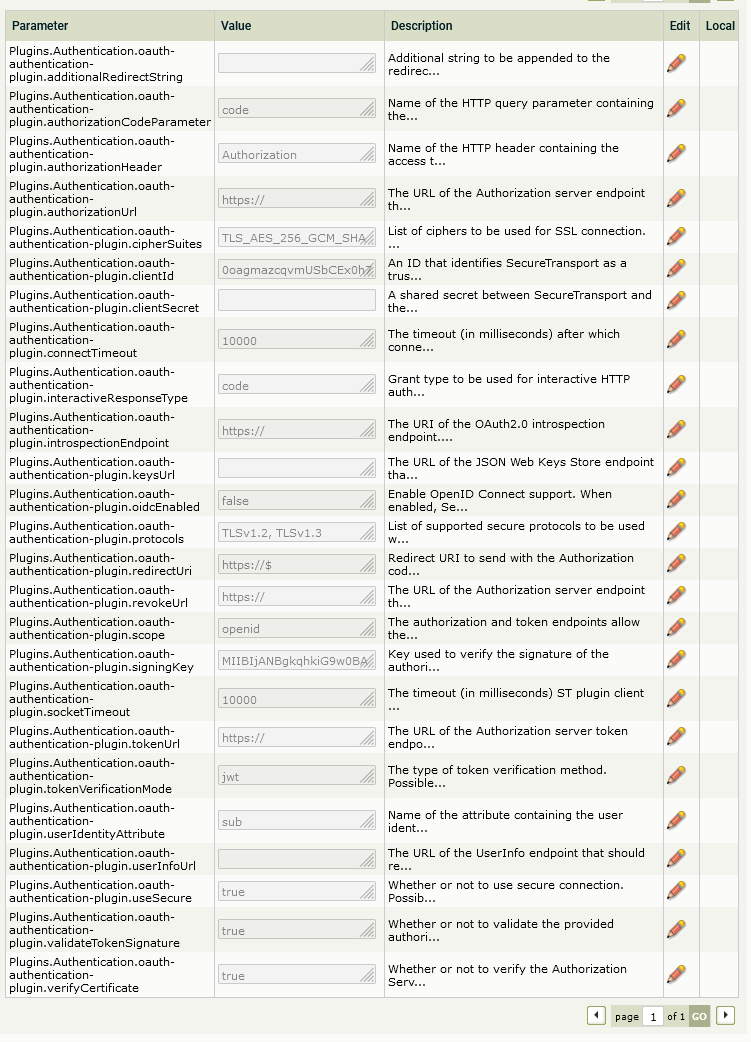
After the plugin has been configured the ST services must be restarted.
Configuration options (detailed)
The following sections focus on the plugin configuration options required for specific authentication flows.
Connectivity settings
The settings are not needed only when authenticating with a JWT token using a static configurable signature validation key.
When Keycloak IDP is used two more cipher suites should be added in cipherSuites - TLS_AES_256_GCM_SHA384, TLS_AKE_WITH_AES_256_GCM_SHA384.
| Setting | Sample value | Description |
| useSecure | true |
Flag for using a secure connection |
| protocols | TLSv1.2 |
Security protocols for establishing a secure connection |
| socketTimeout | 10000 |
Socket timeout |
| connectTimeout | 10000 |
Connection timeout |
| cipherSuites | TLS_ECDHE_RSA_WITH_AES_256_GCM_SHA384, TLS_ECDHE_RSA_WITH_AES_256_CBC_SHA384, TLS_ECDHE_RSA_WITH_AES_128_GCM_SHA256 |
Cipher suites for establishing a secure connection with the identity provider. |
| verifyCertificate | true |
Flag to verify the server certificate or to always trust it. If enabled, please import the server CA certificate into the SecureTransport trusted CAs store. |
Authorization Code flow prerequisite - enable HTTP server redirect
The below settings for the HTTP service in ST are required to enable interactive authentication requiring a REDIRECT.
| Setting | Sample value | Description |
| Http.FdxAuthReply | PREAUTH |
Enables authentication on GET login requests. This allows ST to redirect the end user. |
| Http.RedirectWhiteList | (.*) |
List with allowed redirect locations. This example means all locations are allowed. |
| Http.AllowedAuthenticationParameters | code |
List with allowed HTTP query parameters. The parameter that contains the code returned from the Identity Provider needs to be included here. |
| Http.AllowedAuthenticationParametersMaxSize | 32768 |
Allowed HTTP query parameters size. It should be big enough to hold the code parameter length. |
| Http.Security.SameSite | Lax |
SameSite cookie allowing a redirect from the Identity Provider to SecureTransport. |
| Admin.Security.SameSite | Lax |
SameSite cookie allowing a redirect from the Identity Provider to SecureTransport. |
| LoginSettings.Admin.PREAUTH | true |
Enables pre-authentication for administrators. |
Please note that a proper account configuration (described further in this article) must be created in ST to map users. Otherwise, if the authentication at the Identity Provider side is successful, but there is no matching Account Template, local Account or Administrator, the browser will go into a redirect loop between SecureTransport and the Provider. This is because the unsuccessful login on SecureTransport will automatically trigger a redirect to the Identity Provider, but since the user already has an active session with the provider, an immediate redirection back to SecureTransport will occur. Browsers terminate such loops after a fixed number of attempts.
Authorization Code flow configuration
| Setting | Sample value | Description |
| clientId | someclientid |
ID of the client application (ST) defined with the Identity Provider |
| clientSecret | somesharedclientsecret |
Secret exchanged between SecureTransport and the Identity provider |
| scope | oidc |
Scope of the requested token. |
| tokenUrl | https://provider.url/token/endpoint |
Token endpoint of the identity provider. |
| authorizationUrl | https://provider.url/authorization/endpoint |
Authorization endpoint of the Identity Provider where users enter their credentials. |
| redirectUri |
|
The location where the Identity Provider needs to redirect the end user back after a successful authentication. This is the address of ST login page. The field support a static value or an expression. Supported variables:
All standard ST expression language operators and functions are supported as well. |
| authorizationCodeParameter | code |
Name of the HTTP query parameter that will be returned to SecureTransport when the Identity Provider redirects the logged in user back. |
| oidcEnabled | true |
Enable consumption of ID token. If an ID token is enabled, the user identity attributes are extracted from it. Only used with Authorization code flow. |
| userInfoUrl | https://provider.url/UserInfo/endpoint |
UserInfo endpoint. If populated, an additional request is made to the Identity Provider that returns additional user attributes. Only available for OpenID Connect, when oidcEnabled is true. |
| userIdentityAttribute |
|
Name of the attribute from which the user login name is extracted. This attribute is extracted from:
The filed also supports Expression Language. When in Expression Language mode (starting with $), the user identity equals the evaluated value of the setting. All standard EL operators supported. All token claims and plugin properties can be accessed in the following way: |
| introspectionEndpoint | https://provider.url/introspection/endpoint |
Introspection endpoint of the Identity provider. Used when token verification mode is introspection. When in introspection mode, the signingKey and validateTokenSignature settings are not used. |
| tokenVerificationMode | jwt |
Token verification mode. Possible values:
Note: Introspection token verification mode can only be used if oidcEnabled is set to |
| signingKey | MIIBIjANBgkqhkiG9w0BAQEFAKb3B+v8JxeOJ/7MjSg/vVVtmuSwIDAQAB |
Public key used for signature validation of JWT tokens in X509 Public Key Info format. |
| keysUrl | https://provider.url/keys/endpoint |
Address of the JWKS endpoint used to extract the public signature key for token validation. When specified, signingKey is not used. |
| validateTokenSignature | true |
Flag for validating the token signature. If enabled, tokenVerificationMode must be jwt and there must be a signing key. |
| interactiveResponseType | code |
Grant type to be used for interactive HTTP authentication. |
| additionalRedirectString | &resource=YGB |
OPTIONAL setting. Additional string appended at the end of the redirect address when initiating an interactive authentication. Can be used for specifying a resource ID in ADFS. |
Implicit flow prerequisite - enable HTTP server redirect and allow FORM-POST authentication
The below settings for the HTTP service in ST are required to enable interactive authentication requiring a REDIRECT.
| Setting | Sample value | Description |
| Http.FdxAuthReply | PREAUTH |
Enables authentication on GET login requests. This allows ST to redirect the end user. |
| Http.RedirectWhiteList | (.*) |
List with allowed redirect locations. This example means all locations are allowed. |
| Http.AllowedAuthenticationParameters | id_token;access_token |
List with allowed HTTP query parameters. The parameter that contains the code returned from the Identity Provider needs to be included here. |
| Http.AllowedAuthenticationParametersMaxSize | 32768 |
Allowed HTTP query parameters size. It should be big enough to hold the code parameter length. |
| Http.Security.SameSite | Lax |
SameSite cookie allowing a redirect from the Identity Provider to SecureTransport. |
| Admin.Security.SameSite | Lax |
SameSite cookie allowing a redirect from the Identity Provider to SecureTransport. |
| LoginSettings.Admin.PREAUTH | true |
Enables pre-authentication for administrators. |
| Admin.AllowedFormPostParameters | id_token;access_token |
A list with allowed form-post parameters to be transferred as query parameters during administrators login. |
Implicit flow configuration
The only supported way of receiving tokens using the implicit flow is through FORM POST parameters. The plugin automatically sets the response mode to form-post when redirecting end users to Identity Providers. This method must be supported by the provider.
There are 3 possible combinations for receiving tokens when using Implicit flow and all combinations are supported by setting up different parameters:
• Only receiving an id_token - oidcEnabled is true and userInfoUrl is empty
• Receiving an id_token and access_token - oidcEnabled is true and userInfoUrl is <UserInfo endpoint>. Only the ID token is validated. The access token is used to authorize the UserInfo request.
• Only receiving an access_token - oidcEnabled is false.
| Setting | Sample value | Description |
| clientId | someclientid | ID of the client application (ST) defined with the Identity Provider |
| scope | oidc | Scope of the requested token. |
| authorizationUrl | https://provider.url/authorization/endpoint | Authorization endpoint of the Identity Provider where users enter their credentials. |
| redirectUri |
| The location where the Identity Provider needs to redirect the end user back after a successful authentication. This is the address of ST login page. The field support a static value or an expression. Supported variables:
All standard ST expression language operators and functions are supported as well. |
| oidcEnabled | true | Enable consumption of ID token. If an ID token is enabled, the user identity attributes are extracted from it. Only used with Authorization code flow. |
| userInfoUrl | https://provider.url/UserInfo/endpoint | UserInfo endpoint. If populated, an additional request is made to the Identity Provider that returns additional user attributes. Only available for OpenID Connect, when oidcEnabled is true. |
| userIdentityAttribute |
| Name of the attribute from which the user login name is extracted. This attribute is extracted from:
The filed also supports Expression Language. When in Expression Language mode (starting with $), the user identity equals the valuated value of the setting. All standard EL operators supported. All token claims and plugin properties can be accessed in the following way: |
| tokenVerificationMode | jwt | Token verification mode. Possible values:
Note: Introspection token verification mode can only be used if oidcEnabled is |
| signingKey | MIIBIjANBgkqhkiG9w0BAQEFAKb3B+v8JxeOJ/7MjSg/vVVtmuSwIDAQAB | Public key used for signature validation of JWT tokens in X509 Public Key Info format. |
| keysUrl | https://provider.url/keys/endpoint | Address of the JWKS endpoint used to extract the public signature key for token validation. When specified, signingKey is not used. |
| validateTokenSignature | true | Flag for validating the token signature. If enabled, tokenVerificationMode must be jwt and there must be a signing key. |
| interactiveResponseType | implicit | Grant type to be used for interactive HTTP authentication. |
| additionalRedirectString | &resource=YGB | OPTIONAL setting. Additional string appended at the end of the redirect address when initiating an interactive authentication. Can be used for specifying a resource ID in ADFS. |
Authentication with an access token as a header
| Setting | Sample value | Description |
| authorizationHeader | Authorization | Name of the HTTP header containing the access token. If the header used is "Authorization" the token value should be in the following format: In all other cases the token should be provided as is. |
| clientId | someclientid | ID of the client application (ST) defined with the Identity Provider. Only used if tokenVerificationMode is |
| clientSecret | somesharedclientsecret | Secret exchanged between SecureTransport and the Identity provider. Only used if tokenVerificationMode is |
| userIdentityAttribute | sub | Name of the attribute from which the user login name is extracted. This attribute is extracted from:
|
| introspectionEndpoint | https://provider.url/introspection/endpoint | Introspection endpoint of the Identity Provider. Used when tokenVerificationMode is When in introspection mode, the signingKey and validateTokenSignature settings are not used. |
| tokenVerificationMode | jwt | Token verification mode. Possible values:
|
| signingKey | MIIBIjANBgkqhkiG9w0BAQEFAKb3B+v8JxeOJ/7MjSg/vVVtmuSwIDAQAB | Public key used for signature validation of JWT tokens in X509 Public Key Info format. |
| validateTokenSignature | true | Flag for validating the token signature. If enabled, tokenVerificationMode must be jwt and there must be a signing key. |
Example cURL calls for authentication with access token as header
Using the Authorization header (recommended).
curl -k -v -X GET --header 'Referer: localhost' --header 'accept: application/json' --header 'Content-Type:multipart/form-data' --header 'Authorization:Bearer {<JWT encoded access token>}' https://10.10.10.10/api/v1.4/files/ Using a custom header. The custom header should contain the token value as is. What is important to note is that the Basic Authorization header should be added as well with a base64 encoded string <dummy username>:<empty password>. For example base64-encoded "asd:" string would be YXNkOg==.
curl -k -v -X GET --header 'Referer: localhost' --header 'accept: application/json' --header 'Content-Type:multipart/form-data' --header 'Authorization:Basic YXNkOg==' --header 'CustomHeader:{<JWT encoded access token>}' https://10.10.10.10/api/v1.4/files/Token revocation
Each time the end user or admin logs out, the token is being revoked by sending an additional request with the token to a specific address.
| Setting | Sample value | Description |
| revokeUrl | https://provider.url/revoke/endpoint |
Token revocation endpoint. |
Resource Owner Password Credentials flow
| Option | Sample value | Description |
| clientId | someclientid | ID of the client application (ST) defined with the Identity Provider |
| clientSecret | somesharedclientsecret | Secret exchanged between SecureTransport and the Identity Provider |
| scope | oidc | Scope of the requested token. |
| tokenUrl | https://provider.url/token/endpoint | Token endpoint of the identity provider. |
| introspectionEndpoint | https://provider.url/introspection/endpoint | Introspection endpoint of the Identity Provider. Used when tokenVerificationMode is When in introspection mode, the signingKey and validateTokenSignature settings are not used. |
| tokenVerificationMode | jwt | Token verification mode. Possible values:
|
| signingKey | MIIBIjANBgkqhkiG9w0BAQEFAKb3B+v8JxeOJ/7MjSg/vVVtmuSwIDAQAB | Public key used for signature validation of JWT tokens in X509 Public Key Info format. |
| validateTokenSignature | true | Flag for validating the token signature. If enabled, tokenVerificationMode must be jwt and there must be a signing key. |
End users authentication
Navigate to Admin UI → Accounts → User Accounts → New Account and create a new account. The Account Name should match that from the IDP server. Make sure that the Password is stored locally (not in external directory) checkbox is unchecked.
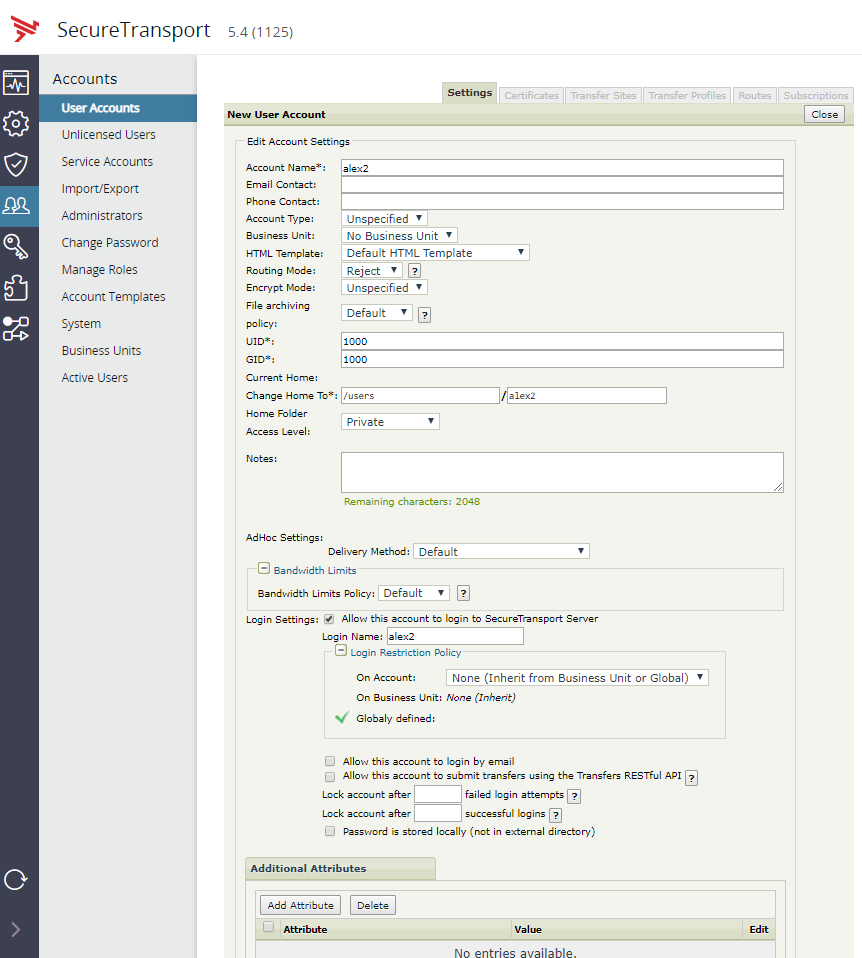
Once the account has been authenticated, you can find messages like below in the TM log:
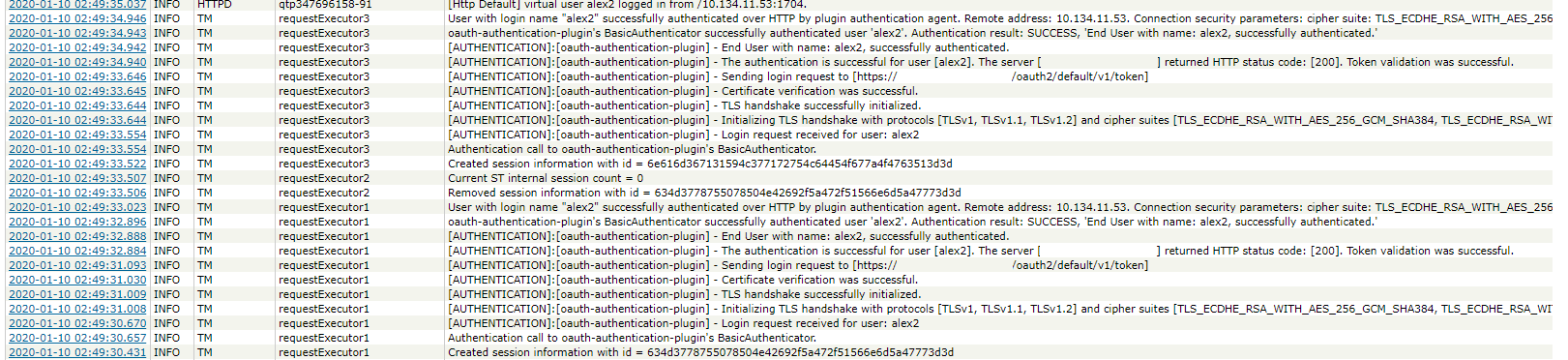
Account Templates can also be authentication with the OAuth Plugin in a similar manner. For more information on how to create an Account Template, you can refer to SecureTransport AdministratorsGuide.
Administrators authentication
Navigate to Admin UI → Accounts → Administrators → New Administrator and create a new administrator. The Administrator Name should match the name which is configured in the IDP server. Make sure that the Password is stored locally (not in external directory) checkbox is unchecked.
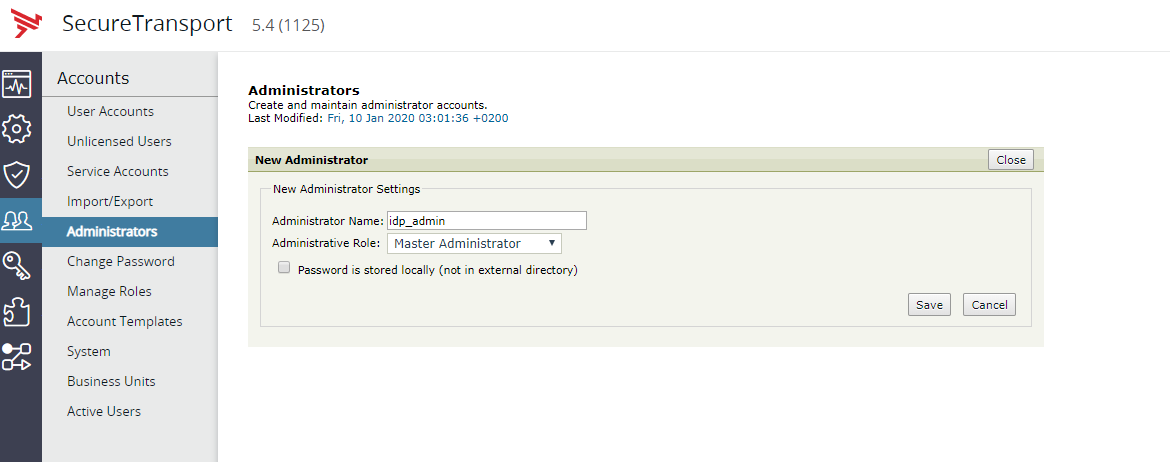
Once the account has been authenticated, you can find messages like below in the Admin and Audit logs:
