KB Article #182933
SMB: Transfer Site additional settings and extended logging
Description
The jNQ library has its own configuration which can be utilized to further adjust SMB plugin behavior based on specific needs. This article will explain some of the basics.
Along with the available settings visible in AdminUI for the SMB Transfer Site there are a few options that can be set in a config file to enable additional functionality and/or logging for SMB transfers.
Solution
The prerequisite is to create the $FILEDRIVEHOME/bin/properties/config.properties file as it does not exist by default. In this file you can add and adjust the below listed options.
Transfer configuration options
The values listed here are the defaults. Having them verbatim in the configuration file will not change the plugin behavior in any way. Editing the values, however, will.RETRYCOUNT=3 TRANSPORTTIMEOUT=5000 CONNECTION_TIMEOUT=4000 MULTICAST_RESOLUTION_TIMEOUT=2000 UNICAST_RESOLUTION_TIMEOUT=2000
In addition to these settings, the below ones could help as well:
ISUSEEXTERNALONLY=true
TRANSPORT=TRANSPORTSMBOVERTCP
• TRANSPORT (can be used for specific mounts via MountParams - transports) - with this parameter you can specify the transport layer to be used. The default is to use both TCP and NetBIOS (i.e. TRANSPORTSMBOVERTCP,TRANSPORTSMBOVERNETBIOS). You can set it to TCP only, and then save TRANSPORTTIMEOUT milliseconds, because JNQ tries NetBIOS after TCP. Note that NetBIOS is quite old and it is very rare to find a server that uses only NetBIOS without TCP. If saving time is important for you, removing NetBIOS is a viable option.
• ISUSEEXTERNALONLY - when set to true, JNQ will use only external resolution methods (which might save time). In general, when the local machine network configuration is correctly set, the external resolving methods are sufficiently efficient, so you should consider setting this parameter to true to boost performance. The default value for ISUSEEXTERNALONLY is false.
Enable additional logging
The following table lists the avaialble parameters and their function:
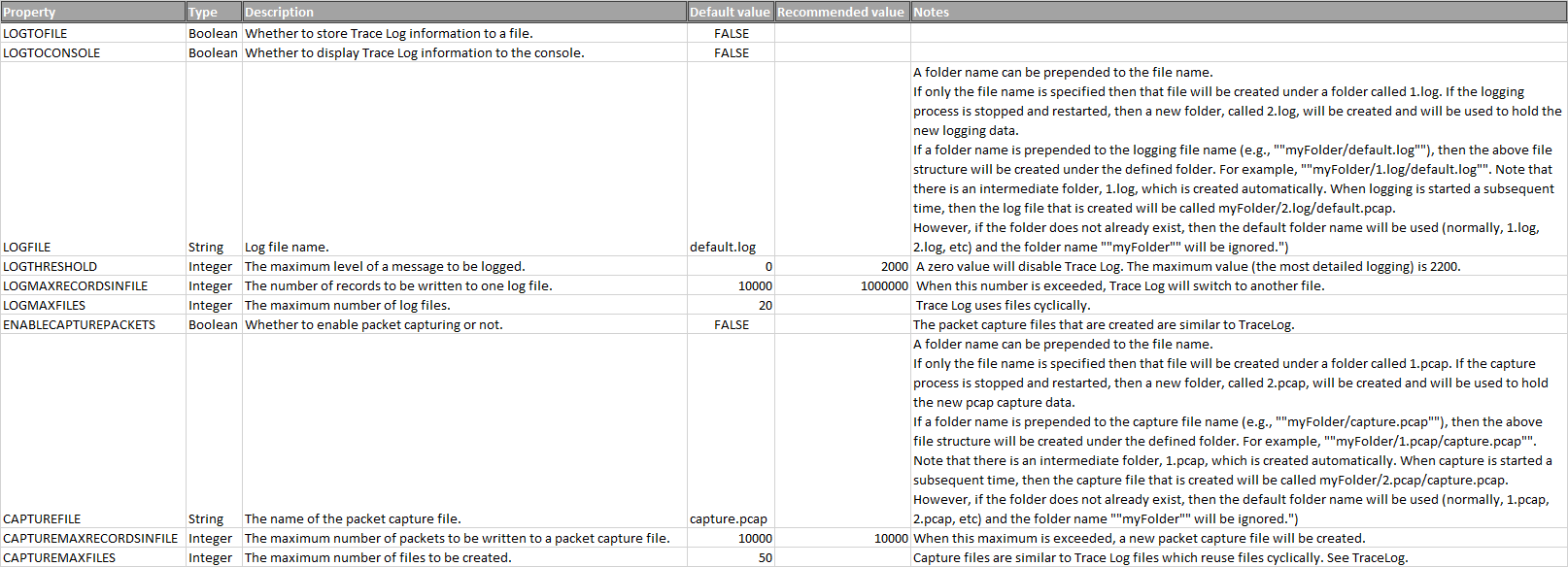
Here is an example setup for additional logging:
LOGTOFILE=true
LOGTHRESHOLD=2200
LOGFILE=/opt/axway/SecureTransport/var/logs/smb/smb.log
LOGMAXRECORDSINFILE=10000
LOGMAXFILES=20
ENABLECAPTUREPACKETS=true
CAPTUREFILE=/opt/axway/SecureTransport/var/logs/smb/smb_capture.pcap
The below options break the transfers if the plugin version is below 2.1.3, so if your plugin is older just omit them.
CAPTUREMAXRECORDSINFILE=10000
CAPTUREMAXFILES=50
All changes made to the config.properties file will become effective only after TM restart.