Reusing objects between Folders
In the Integration-Services workbench, use Folders to store and organize your object definitions.
Folders are displayed in the upper left pane of the Integration-Services workbench. You can only select Folders to which you have authorized access. Authorized Folders are displayed in bold font.
If access to a Folder is unauthorized but you have some rights on its child Folders, then the unauthorized Folders are visible but are grayed out. If you have no rights on the child Folders, the unauthorized Folders are not visible.
For details on creating Folders in the Administration workbench, see Creating Folders.
The first time you log on to Composer, the software connects you to the first WorkFolder in the list of available Folders displayed in the left pane. The next time you log on, the software connects you to the last WorkFolder that you accessed.
Several users can access a given WorkFolder at the same time, but only one user can access a given object at a time. For details, see Locks on objects.
To restrict access to Folders, the administrator must specify Folder access for the User. For details, see About Users.
The name of the current Folder is displayed on the status bar. Position the cursor on the Folder name to display a hint bar with the complete path to the Folder.
Double-click the Folder name to expand the list of Folders in the upper left pane and highlight the current Folder.
Objects can reuse other objects. For example, an Integration-Services-Diagram uses a Channel and a Channel uses a Axway Server, an Application or a Partner.
In the Integration-Services workbench, objects can only reuse any objects in the same Folder, or in a different Folder, on condition that both Folders belong to the same root Folder.
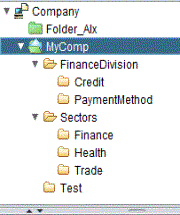
For example, objects in the Folder Health can reuse objects in the Folder Credit because both Folders belong to the same root Folder MyCompany. On the other hand, objects in Health cannot reuse objects in MySubCompany because they do not belong to the same root Folder.
To reuse objects in the current WorkFolder, drag-and-drop the object from the left pane to the appropriate field.
To use an object in a parent WorkFolder or a PrebuiltFolder, you must
drag-and-drop the object from the Entity
Browser
to the appropriate field in an object window. When drag-and-drop operations
are possible, the  icon is displayed next to the field.