About the object life cycle and statuses
Object life cycle describes the sequence of object statuses that you set as you work with an object. Object statuses allow you to monitor the progress of objects from creation to completion, and from completion to execution. In other words, the object life cycle parallels the series of actions that you perform when you define an object, upgrade an object or send the object to Server.
All objects have status settings. Sub-objects areobjects that are wholly defined inside a parent object. For example, a CommAdapter is always defined as part of, and inseparable from, a given Axway Server. Although sub-objects do not have a status setting, their definition must be valid and correct before you can check the parent object.
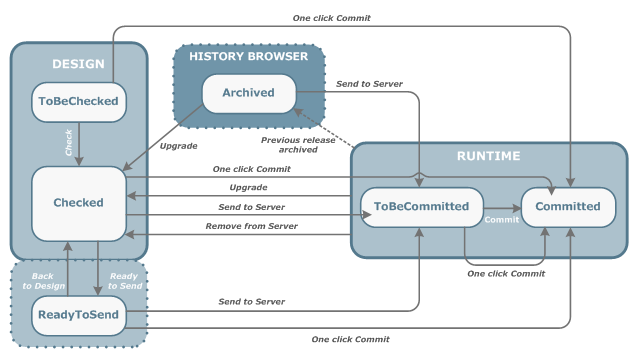
The following diagram schematically illustrates the object life cycle. Click the links on the diagram to display the procedures for setting each object status.
Note: The following diagram of the object life cycle includes the status ToBeCommitted and the Commit command. This additional step in the life cycle only applies to Transfer CFT. For all other products, the Send to Server operation transfers the object to the run-time environment and commits it in a single step.
From the Finance tab an additional life cycle command is available: Update Server. This command enables you to update the content of a Table that is already in production. For more information on the Finance tab, refer to the Axway AccountingIntegrator documentation.
As illustrated, the object life cycle is:
For example, you cannot send to Server an object that has the status ToBeChecked. First you must check the object. If all the object property definitions are valid, Composer sets the status of the object and the objects it uses to Checked. You can then send it to Server.
Object statuses are set as you work with an object. Sometimes you explicitly set the status of an object. For example, to set the status of an object to Checked, use the Check command in Composer.
At other times, you implicitly set the status of an object. For example, when you replace an object that is in production with a more recent revision of the same object, Composer archives the previous version of the object. Its status is implicitly set to Archived. Use the History Browser to view archived instances of an object.
The status of an object is displayed both as a label and as an icon.
To display the status of an object as:
When an object has a given status, all objects that the object uses always have the same status. So, if an object has the status Checked, all the objects that it uses also have the status Checked.
The following table provides details about each status in the object life cycle and describes all possible operations for each life cycle status. Keep in mind that the operations listed in the following table depend on your user rights.
| Status | Details |
|---|---|
|
ToBeChecked
|
This is the initial status of all objects. An object has ToBeChecked status when you:
When an object has ToBeChecked status, you can: |
|
Checked
|
An object has the status Checked when:
When an object has Checked status, you can: |
|
ReadyToSend
|
ReadyToSend is an optional status. When you complete an object definition, you can then indicate that the design phase is finished via the Ready to send command. When an object has the status ReadyToSend:
|
|
BroadcastInProgress
|
BroadcastInProgress is a temporary status that indicates that the Send to Server operation is started, but not yet complete. When an object has the status BroadcastInProgress, you cannot perform any actions on it. If the Send to Server operation is successful, the object status changes to ToBeCommitted or Committed, depending on the Axway product. If the Send to Server operation is unsuccessful, the object status returns to Checked. |
|
ToBeCommitted
|
Note: This status only applies to Transfer CFT. An object has the status ToBeCommitted when you have sent it to Server on at least one Axway Server, but have not yet committed the object. You can perform the following actions on an object with this status:
You cannot modify or delete objects with the ToBeCommitted status. |
|
Committed
|
When an object is in execution in at least one run-time environment, it takes the status Committed. An object is Committed when you:
When an object has the status Committed, all objects that use the object also have the status Committed. You can perform the following actions on an object with this status:
You cannot modify or delete objects with the Committed status. |
|
PartiallyCommitted
|
The status PartiallyCommitted only applies to Channel objects. It indicates that the Channel was successfully committed on some, but not all the Servers. When a Channel has the status PartiallyCommitted, the configuration at each end of the Channel is incompatible, so communication via this Channel is not possible. To rectify the problem, send the Channel to Server again on the Axway Server where the operation failed. |
|
Archived
|
Archived is an implicit status. You cannot send an object to Archive. When you upgrade an object, the status of the revision version of the object is set to Checked. If you send the new object revision to Server, it overwrites the previous instance of the object in the run-time environment. The previous instance is then automatically archived and is available via the History Browser. Its status is set to Archived. When an object has the status Archived, all objects that use the object also have the status Archived. You can perform the following actions on an object with this status:
|


