Axway Composer > Getting started > Deploying the configuration
Deploying the configuration
This topic focuses on how you transfer valid, or Checked, objects from the design environment
to the run-time environment.
This can be done:
- in connected mode, via a Broadcast agent.
- in disconnected mode, using a deployment container. Disconnected deployment fulfils the same objective as a broadcast operation or Send to Server command, but without requiring a connection between Composer and the Axway Server. Refer to the Synchrony 4.3 Deployment Guide for more information.
The following diagram illustrates how the Axway Composer products
interact in connected mode.
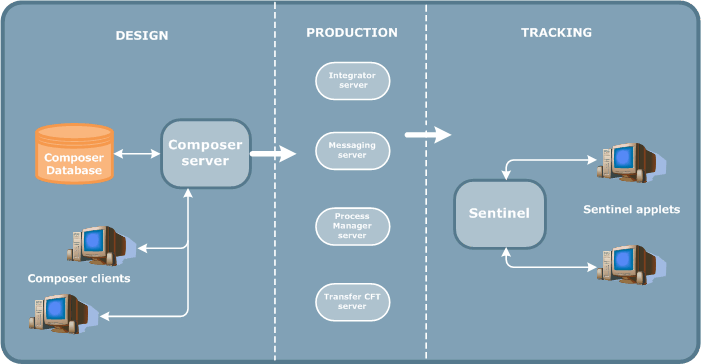
About the Composer Broadcast Agent
The Composer Broadcast Agent is the product responsible for the following
broadcasting operations:
- Send
to Server:
Send the selected objects to the Axway Server. This operation only
sends objects that are not already Committed
or ToBeCommitted.
- Send
to Server Complete:
Send to the Axway Server the selected object and all the objects it
uses, regardless of whether they are already in the run-time environment.
- Commit:
start executing objects in the run-time environment. This command only
applies to Axway Transfer CFT.
- Remove
from Server:
remove from the Axway Server the object and all objects that use it.
- Import Object Set:
import into Composer the existing object set for a given Axway Server.
- Install Product:
initialize Axway Server installation.
The Broadcast Agent architecture depends on the Axway Server you
are using.
- Transfer
CFT and Messaging: a single
Broadcast Agent, either installed with the Composer Server or on a separate
machine.
- Integrator,
ProcessManager and Sentinel:
the Broadcast Agent is integrated into the server of the Axway Server.
Each server has one Broadcast Agent. For each broadcasting operation,
the Composer Client transmits the object identifiers to the Broadcast
Agent. The Agent then searches for the corresponding objects in the Composer
Database and updates the Server repository directly.
- AccountingIntegrator: you can install one or more Broadcast Agents for each engine. The Broadcast Agent is a product that you can install where you like. For example, you can install:
- a single Broadcast Agent on the Composer Server
- one Agent per Unix machine (this involves transferring the configuration files between the Agent and the environment via FTP)
- one Agent per environment
Transactional integrity
The Composer Broadcast Agent guarantees transactional integrity. That
is, when you send an object to Server, Composer processes the object and
all objects associated with it as a transaction. If a Send to Server operation
is successful, all objects in the transaction are sent to the Axway Server(s). If an error occurs, the operation is canceled for all objects.
Sending objects to Servers
To deploy objects to the run-time environment, you must first declare
the Axway Server where you will execute the configuration. You do
this in the Topography workbench. In the Axway Server definition,
you must specify the host and port used to communicate with the Composer
Broadcast Agent.
Each Composer object follows a life cycle where each phase in the cycle
has a corresponding life cycle status, as described in the Object
life cycle topic.
To deploy an object, you must perform a series of actions in order to
validate the object definition and put it into production.
- Check
the object: its status passes from ToBeChecked
to Checked.
- Optionally, set the object
status to ReadyToSend: lock the
object definition so that it can no longer be modified.
- Send
the object to Server: send
the object to the run-time environment. In the case of most Axway Servers, this command also commits the object in run-time. However, in
the case of Transfer CFT, you must also perform a second step and Commit the object.
Multiple Axway Servers
Via a single command, Send to Server,
you can simultaneously take into account the new configuration on multiple
Axway Servers, and so guarantee the coherence of all installations.
Monitoring and managing connected deployment
Axway Composer provides two tools to help you manage deployment:
- Broadcast
Browser: to track progress
of broadcast operations, restart, force or cancel broadcasts on Axway Servers in error, and create new broadcast operations.
- Server
Browser: to view the objects on a given Axway Server
Removing objects from the run-time environment
You can use the Modify command
to modify Topography objects without removing them from the Server.
However, you cannot modify Integration-Services objects that are sent
to Server. You must remove the object from the run-time environment (and
so interrupt execution) first. Alternatively, if you are using a Transfer
CFT or Messaging Enabler, you can create a revision of the object, using
the Upgrade command.
Object revision management enables you to maintain a history of object
modifications, as described in the next
topic.
However, the object revision functionality is only available for the Transfer
CFT and Messaging Enablers.