KB Article #181379
FLASH EOL: Identifying and using the correct pepflashplayer.dll
Why do I need the pepflashplayer.dll?
Flash Player is a prerequisite for accessing the FLEX GUI of some Axway products.
Axway delivered a tool, Axway Desktop Client (ADC), which is a headless browser that uses the customer's flash player DLL to allow users to continue to connect to Axway applications after the FLASH EOL event.
Similarly with other Chromium browsers this tool needs a Flash plugin, called Pepper (pepflashplayer.dll), which the user must provide to the tool. The latest Flash Player releases containing this plugin are:
- 32.0.0.453 released on November 10th 2020
- 32.0.0.465 released on December 8th, 2020
A 64 bit version of pepflashplayer.dll needs to be located, secured and used in ADC in order to continue playing FLASH content after Jan 12 2012.
Where can I find the pepflashplayer.dll?
Due to legal restrictions Axway cannot deliver or embed any version of flash player DLL in Axway Desktop Client or other Axway product. Alternatives are:
1. Until Jan 1st 2021 the latest version of pepflashplayer.dll can be retrieved from Adobe site, from official Flash player installations like Offline Flash installer (recommended) or Online Flash installer (no longer available).
Starting with Jan 1st 2021 Adobe will stop delivering Flash Player and the above sources may no longer be available.
Using the above installers the pepflashplayer.dll will be installed in the following location:
C:\Windows\System32\Macromed\Flash\pepflashplayer64_32_0_0_465.dll
2. Alternatively, pepflashplayer.dll can be located on internal environments where it was backed up or already installed - either at OS level or as part of browser installation.
Standard paths where pepflashplayer.dll might be found are:
C:\Windows\System32\Macromed\Flash\pepflashplayer64_32_0_0_465.dll
C:\Users\%username%\AppData\Local\Google\Chrome\User Data\PepperFlash\32.0.0.465\pepflashplayer.dll
C:\Users\%username%\AppData\Local\Microsoft\Edge\User Data\PepperFlash\32.0.0.465\pepflashplayer.dll
Note 1: System32 folder actually contains the needed 64 bit version of the dll - identified by the 64 in the name pepflashplayer64_32_0_0_465.dll
Note 2: The actual name and path may be different depending on the version available on the system. The above examples are based on 32.0.0.465 version.
3. Additionally, pepflashplayer.dll might be found online on 3rd party sites; however, users are advised to use caution when accessing such sites as the DLL versions unauthorized by Adobe are a common source of malware and viruses.
HARMAN is the official enterprise distributor for Flash Player and enterprises should contact Harman to discuss Flash Player support and Flash Player security updates after the EOL Date.
More details can be found in the Adobe Flash EOL Announcement, Enterprise Information Page and FAQ.
One should check with a system administrator before taking a decision towards using pepflashplayer.dll from non-adobe source.
Am I using the right version of pepflashplayer.dll?
ADC uses the peflashplayer.dll identified by the pluginLocation variable within AxwayDesktopClient/resources/whitelist.json config file.
This variable needs to point towards a 64 bit version of the peflashplayer.dll. Axway tested ADC with the latest Flash versions: 32.0.0.453 and 32.0.0.465.
Please find below more details that can help you determine if you are using the correct version of the DLL.
Version
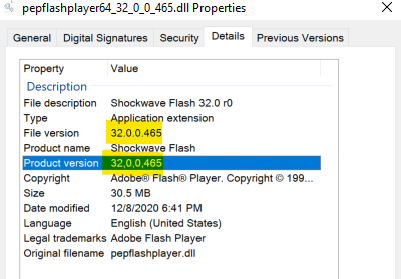
To check the version of the DLL:
- Right click on the pepflashplayer.dll and choose Properties
- Go to Details tab
- Check the Product/File Version:
Digital Signature
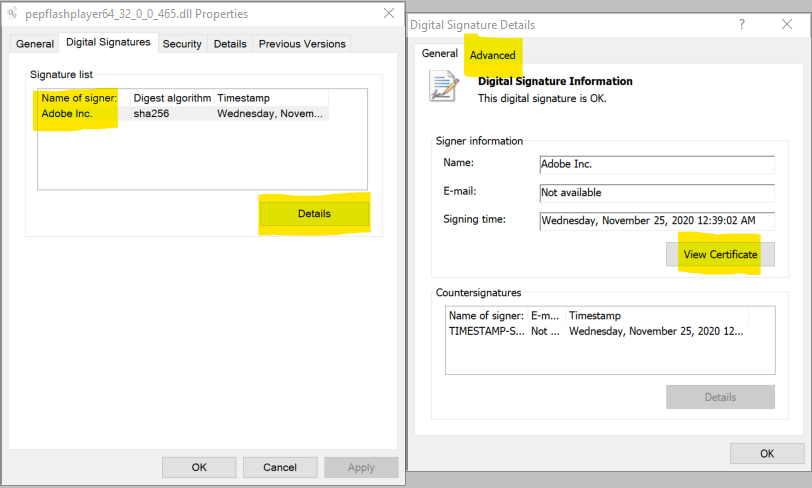
Digital signatures can be used to verify the author's identity and ensure that the code has not been changed or corrupted since it was signed by the author. To check/verify the digital signature of the DLL:
- Right click on the pepflashplayer.dll and choose Properties
- Go to Digital Signature tab
- Check that a digital signature exists.
- Click Details for more details (like View certificate or Advanced).
File integrity
MD5 & SHA Checksum Utility was used to generate the hashes below for the last 2 Flash Player versions to help verifying that the file integrity is ok.
Product version: 32,0,0,465
Original filename: pepflashplayer.dll
MD5 Checksum: AF6D91D849B5AD7BF71CE730EF1AC0E0
SHA-1 Checksum: EB3878D9A52308BC5DB8D55E51F5A83D97970691
SHA-256 Checksum: C022429EFFEC49522867196DAFA259AF0843AEAE355BE0366D7321AC854F561A
SHA-512 Checksum: 3293BEC74643C80C56BD32E771C223F8C9E7ECA325C21F85F52F72B9E68AC708CB7E52ED1539558C9A32F7B85D59C1EC40447EDFEE9EFF29C30EBA3F0B4D30BD
Product version: 32,0,0,453
Original filename: pepflashplayer.dll
MD5 Checksum: A9D4090D6A971E1EE366B331AD6A15FD
SHA-1 Checksum: 537D3BE3258BA18DF5244A22D74B34A926891150
SHA-256 Checksum: E96B92EFC26F5D258BFC11E333D6DAA439231E1DFAAC17D87F532A6E649F3C1B
SHA-512 Checksum: 2AAD9C8FB92AC2D100DAC7DFAF47565267FDF6594D30E427B2FEB53C0D6B26A8A1AD69AE0DF3FA9FE58C4061B03A12B9FE5A53EF744845A4FDA4BE9A67EA2F0A
Architecture of pepflashplayer.dll
ADC needs the 64 bit version of the pepflashplayer.dll. The 32 bit version of the DLL will not work in ADC and will generate the error: Couldn't load plugin.
To check the architecture of pepflashplayer.dll (32bit vs 64bit) one could use Sigcheck tool (part of Microsoft Sysinternals Suite).
For a 64-bit dll the MachineType value is 64-bit - see the last line from the sample below.
Sample check output:
> sigcheck.exe pepflashplayer.dll
Sigcheck v2.80 - File version and signature viewer
Copyright (C) 2004-2020 Mark Russinovich
Sysinternals - <a href="http://www.sysinternals.com">www.sysinternals.com</a>
pepflashplayer.dll:
        Verified:       Signed
        Signing date:   12:39 AM 11/25/2020
        Publisher:      Adobe Inc.
        Company:        Adobe
        Description:    Shockwave Flash 32.0 r0
        Product:        Shockwave Flash
        Prod version:   32,0,0,465
        File version:   32,0,0,465
        MachineType:    64-bit
FLASH EOL related articles:
FLASH EOL: Axway products impacted by Adobe Flash Player end of life
FLASH EOL: Axway Desktop Client - simplified User Guide
FLASH EOL: How to override FLASH EOL and whitelist domains in main browsers on Windows
FLASH EOL: How to activate debug when troubleshooting Axway Desktop Client?
FLASH EOL: Identifying and using the correct pepflashplayer.dll